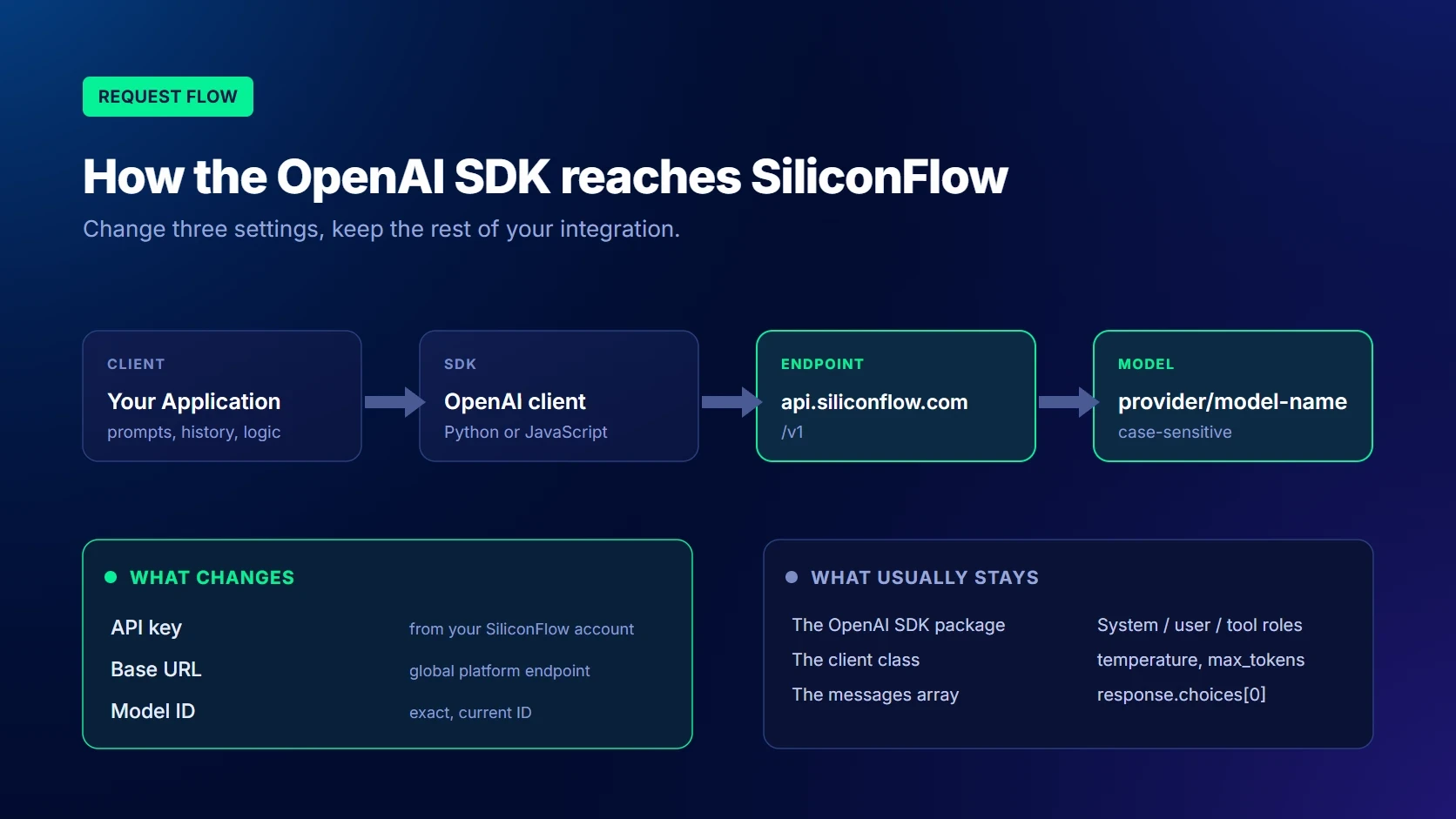
You can use the OpenAI SDK with SiliconFlow by changing three core settings: the API key, base URL, and model ID. For applications built around Chat Completions, much of the existing client, message, and response-handling logic can remain unchanged. However, OpenAI-compatible does not mean every endpoint or advanced feature behaves identically. This guide explains the required configuration, provides Python and JavaScript examples, and shows how to test streaming, tools, structured outputs, vision, reasoning, limits, and errors before production.
What Does an OpenAI-Compatible API Mean for Developers?
An OpenAI-compatible API follows familiar request and response patterns used by the OpenAI SDK. Instead of replacing the SDK or rebuilding the application’s entire integration layer, developers can configure the existing client to send requests to SiliconFlow.
For supported language models, the application can continue using the Chat Completions method:
client.chat.completions.create()
SiliconFlow’s global API Base URL is:
https://api.siliconflow.com/v1
The current Quick Start uses this endpoint with the OpenAI Python library and notes that the platform supports most OpenAI-related parameters.
What Can Usually Stay the Same?
For a standard text-generation application, the following elements can often remain unchanged:
The OpenAI SDK package
The OpenAI client class
The chat.completions.create() method
The messages array
System, user, assistant, and tool roles
Basic parameters such as temperature, max_tokens, and stream
Final-answer parsing through response.choices[0].message.content
This reduces migration work because the application can retain its existing prompt construction, conversation history, and core business logic.
It also makes model evaluation easier. When the provider settings and model ID are stored in configuration, teams can test different models without creating a separate SDK integration for each one.
What Still Depends on the API Provider and Model?
OpenAI-compatible does not mean that every OpenAI endpoint or model feature is reproduced identically.
The following areas still require compatibility testing:
Available model IDs
Supported request parameters
Context windows and output limits
Function Calling behavior
JSON Mode and Structured Outputs
Vision and multimodal inputs
Reasoning controls
Additional response fields
Streaming chunk behavior
Rate limits
Model availability
The safest approach is to treat API compatibility as a way to reduce integration work, not as a substitute for testing the selected model.
What Changes When You Connect an OpenAI SDK App to SiliconFlow?
API Key and Authentication
Create an API key in the SiliconFlow platform and store it in an environment variable:
exportSILICONFLOW_API_KEY="your-api-key"
exportSILICONFLOW_API_KEY="your-api-key"
exportSILICONFLOW_API_KEY="your-api-key"
The OpenAI SDK sends the key through Bearer authentication when the client is initialized.
Do not expose API keys in:
Source code
Public repositories
Browser applications
Log output
Screenshots
Shared configuration files
Production applications should load credentials from a protected server-side environment or secret manager.
GET https://api.siliconflow.com/v1/models
Authorization:Bearer YOUR_SILICONFLOW_API_KEY
GET https://api.siliconflow.com/v1/models
Authorization:Bearer YOUR_SILICONFLOW_API_KEY
GET https://api.siliconflow.com/v1/models
Authorization:Bearer YOUR_SILICONFLOW_API_KEY
The model-list endpoint can filter results by model type or subtype, including chat, embedding, reranker, image, audio, and video models.
Keep the model ID in an environment variable or configuration file rather than repeating it throughout the codebase.
Request Parameters and Model-Specific Support
Common Chat Completions parameters include:
model
messages
stream
temperature
top_p
max_tokens
stop
tools
response_format
Advanced parameters may only apply to specific models:
enable_thinking
thinking_budget
min_p
tools
response_format
image_url
detail
Do not automatically copy every parameter used with another provider. Begin with a minimal request containing only model and messages, then add optional parameters individually.
Provider-specific fields can be passed through extra_body in Python:
Only include these fields after confirming that the selected model supports them.
Response Fields and Error Handling
A standard non-streaming answer is usually available at:
response.choices[0].message.content
Reasoning models may also return:
response.choices[0].message.reasoning_content
Applications should not assume that every response contains a non-empty choices array or that every model returns the same fields. Validate the response before accessing nested values.
Step-by-Step: Connect an OpenAI SDK Application to SiliconFlow
Copy the exact model ID from the current Models page rather than relying on a static example that may become outdated.
Initialize the SiliconFlow Client
Python:
importosfromopenaiimportOpenAIapi_key = os.getenv("SILICONFLOW_API_KEY")model_id = os.getenv("SILICONFLOW_MODEL")ifnotapi_key:
raiseRuntimeError("SILICONFLOW_API_KEY is not configured.")ifnotmodel_id:
raiseRuntimeError("SILICONFLOW_MODEL is not configured.")client = OpenAI(api_key=api_key,base_url=os.getenv("SILICONFLOW_BASE_URL","https://api.siliconflow.com/v1",),)
importosfromopenaiimportOpenAIapi_key = os.getenv("SILICONFLOW_API_KEY")model_id = os.getenv("SILICONFLOW_MODEL")ifnotapi_key:
raiseRuntimeError("SILICONFLOW_API_KEY is not configured.")ifnotmodel_id:
raiseRuntimeError("SILICONFLOW_MODEL is not configured.")client = OpenAI(api_key=api_key,base_url=os.getenv("SILICONFLOW_BASE_URL","https://api.siliconflow.com/v1",),)
importosfromopenaiimportOpenAIapi_key = os.getenv("SILICONFLOW_API_KEY")model_id = os.getenv("SILICONFLOW_MODEL")ifnotapi_key:
raiseRuntimeError("SILICONFLOW_API_KEY is not configured.")ifnotmodel_id:
raiseRuntimeError("SILICONFLOW_MODEL is not configured.")client = OpenAI(api_key=api_key,base_url=os.getenv("SILICONFLOW_BASE_URL","https://api.siliconflow.com/v1",),)
JavaScript:
importOpenAIfrom"openai";constapiKey = process.env.SILICONFLOW_API_KEY;constmodel = process.env.SILICONFLOW_MODEL;if(!apiKey){thrownewError("SILICONFLOW_API_KEY is not configured.");}if(!model){thrownewError("SILICONFLOW_MODEL is not configured.");}constclient = newOpenAI({apiKey,baseURL:process.env.SILICONFLOW_BASE_URL ??
"https://api.siliconflow.com/v1",});
importOpenAIfrom"openai";constapiKey = process.env.SILICONFLOW_API_KEY;constmodel = process.env.SILICONFLOW_MODEL;if(!apiKey){thrownewError("SILICONFLOW_API_KEY is not configured.");}if(!model){thrownewError("SILICONFLOW_MODEL is not configured.");}constclient = newOpenAI({apiKey,baseURL:process.env.SILICONFLOW_BASE_URL ??
"https://api.siliconflow.com/v1",});
importOpenAIfrom"openai";constapiKey = process.env.SILICONFLOW_API_KEY;constmodel = process.env.SILICONFLOW_MODEL;if(!apiKey){thrownewError("SILICONFLOW_API_KEY is not configured.");}if(!model){thrownewError("SILICONFLOW_MODEL is not configured.");}constclient = newOpenAI({apiKey,baseURL:process.env.SILICONFLOW_BASE_URL ??
"https://api.siliconflow.com/v1",});
Select an Available Model ID
Before choosing a production model, check:
Supported input types
Context window
Maximum output
Tool support
Structured output support
Reasoning behavior
Expected latency
Current token price
Availability
SiliconFlow provides access to language and multimodal models through a consistent API workflow, allowing developers to select models according to the requirements of each task.
Send and Verify the First Request
Begin with a minimal non-streaming request:
response = client.chat.completions.create(model=model_id,messages=[{"role": "user","content": "Reply with exactly: Connection successful",}],temperature=0,max_tokens=20,)ifnotresponse.choices:
raiseRuntimeError("The API returned no completion choices.")print(response.choices[0].message.content)
response = client.chat.completions.create(model=model_id,messages=[{"role": "user","content": "Reply with exactly: Connection successful",}],temperature=0,max_tokens=20,)ifnotresponse.choices:
raiseRuntimeError("The API returned no completion choices.")print(response.choices[0].message.content)
response = client.chat.completions.create(model=model_id,messages=[{"role": "user","content": "Reply with exactly: Connection successful",}],temperature=0,max_tokens=20,)ifnotresponse.choices:
raiseRuntimeError("The API returned no completion choices.")print(response.choices[0].message.content)
Verify that:
The request reaches the intended endpoint.
The model accepts the request.
The response contains at least one choice.
The content can be parsed correctly.
The request completes within the expected timeout.
Credentials do not appear in logs.
Test advanced capabilities only after the basic request succeeds.
Python Example: Use the OpenAI SDK With SiliconFlow
importosimportsysfromopenaiimport(APIConnectionError,APIStatusError,APITimeoutError,OpenAI,)api_key = os.getenv("SILICONFLOW_API_KEY")base_url = os.getenv("SILICONFLOW_BASE_URL","https://api.siliconflow.com/v1",)model_id = os.getenv("SILICONFLOW_MODEL")ifnotapi_key:
raiseRuntimeError("SILICONFLOW_API_KEY is not configured.")ifnotmodel_id:
raiseRuntimeError("SILICONFLOW_MODEL is not configured.")client = OpenAI(api_key=api_key,base_url=base_url,timeout=60.0,max_retries=2,)try:
response = client.chat.completions.create(model=model_id,messages=[{"role": "system","content": "You are a concise technical assistant.",},{"role": "user","content": ("Explain one benefit of an ""OpenAI-compatible API."),},],temperature=0.2,max_tokens=200,)ifnotresponse.choices:
raiseRuntimeError("The API returned no completion choices.")print(response.choices[0].message.content)exceptAPITimeoutError:
print("The request timed out.",file=sys.stderr)exceptAPIConnectionErroraserror:
print(f"Unable to connect to SiliconFlow: {error}",file=sys.stderr,)exceptAPIStatusErroraserror:
print(f"SiliconFlow returned HTTP {error.status_code}: "f"{error.response}",file=sys.stderr,)
importosimportsysfromopenaiimport(APIConnectionError,APIStatusError,APITimeoutError,OpenAI,)api_key = os.getenv("SILICONFLOW_API_KEY")base_url = os.getenv("SILICONFLOW_BASE_URL","https://api.siliconflow.com/v1",)model_id = os.getenv("SILICONFLOW_MODEL")ifnotapi_key:
raiseRuntimeError("SILICONFLOW_API_KEY is not configured.")ifnotmodel_id:
raiseRuntimeError("SILICONFLOW_MODEL is not configured.")client = OpenAI(api_key=api_key,base_url=base_url,timeout=60.0,max_retries=2,)try:
response = client.chat.completions.create(model=model_id,messages=[{"role": "system","content": "You are a concise technical assistant.",},{"role": "user","content": ("Explain one benefit of an ""OpenAI-compatible API."),},],temperature=0.2,max_tokens=200,)ifnotresponse.choices:
raiseRuntimeError("The API returned no completion choices.")print(response.choices[0].message.content)exceptAPITimeoutError:
print("The request timed out.",file=sys.stderr)exceptAPIConnectionErroraserror:
print(f"Unable to connect to SiliconFlow: {error}",file=sys.stderr,)exceptAPIStatusErroraserror:
print(f"SiliconFlow returned HTTP {error.status_code}: "f"{error.response}",file=sys.stderr,)
importosimportsysfromopenaiimport(APIConnectionError,APIStatusError,APITimeoutError,OpenAI,)api_key = os.getenv("SILICONFLOW_API_KEY")base_url = os.getenv("SILICONFLOW_BASE_URL","https://api.siliconflow.com/v1",)model_id = os.getenv("SILICONFLOW_MODEL")ifnotapi_key:
raiseRuntimeError("SILICONFLOW_API_KEY is not configured.")ifnotmodel_id:
raiseRuntimeError("SILICONFLOW_MODEL is not configured.")client = OpenAI(api_key=api_key,base_url=base_url,timeout=60.0,max_retries=2,)try:
response = client.chat.completions.create(model=model_id,messages=[{"role": "system","content": "You are a concise technical assistant.",},{"role": "user","content": ("Explain one benefit of an ""OpenAI-compatible API."),},],temperature=0.2,max_tokens=200,)ifnotresponse.choices:
raiseRuntimeError("The API returned no completion choices.")print(response.choices[0].message.content)exceptAPITimeoutError:
print("The request timed out.",file=sys.stderr)exceptAPIConnectionErroraserror:
print(f"Unable to connect to SiliconFlow: {error}",file=sys.stderr,)exceptAPIStatusErroraserror:
print(f"SiliconFlow returned HTTP {error.status_code}: "f"{error.response}",file=sys.stderr,)
This example keeps the credentials, Base URL, and model ID outside the source code while handling timeouts, connection failures, and non-successful HTTP responses.
JavaScript and TypeScript Example: Use the OpenAI SDK With SiliconFlow
importOpenAIfrom"openai";constapiKey = process.env.SILICONFLOW_API_KEY;constbaseURL =
process.env.SILICONFLOW_BASE_URL ??
"https://api.siliconflow.com/v1";constmodel = process.env.SILICONFLOW_MODEL;if(!apiKey){thrownewError("SILICONFLOW_API_KEY is not configured.");}if(!model){thrownewError("SILICONFLOW_MODEL is not configured.");}constclient = newOpenAI({apiKey,baseURL,timeout:60_000,maxRetries:2,});asyncfunctionmain(){try{constresponse = awaitclient.chat.completions.create({model,messages:[{role:"system",content:"You are a concise technical assistant.",},{role:"user",content:"Explain one benefit of an OpenAI-compatible API.",},],temperature:0.2,max_tokens:200,});constcontent = response.choices[0]?.message?.content;if(!content){thrownewError("The API returned no assistant content.");}console.log(content);}catch(error){if(errorinstanceofOpenAI.APIError){console.error(`SiliconFlow API error ${error.status}: ${error.message}`);return;}console.error("Request failed:",error);}}main();
importOpenAIfrom"openai";constapiKey = process.env.SILICONFLOW_API_KEY;constbaseURL =
process.env.SILICONFLOW_BASE_URL ??
"https://api.siliconflow.com/v1";constmodel = process.env.SILICONFLOW_MODEL;if(!apiKey){thrownewError("SILICONFLOW_API_KEY is not configured.");}if(!model){thrownewError("SILICONFLOW_MODEL is not configured.");}constclient = newOpenAI({apiKey,baseURL,timeout:60_000,maxRetries:2,});asyncfunctionmain(){try{constresponse = awaitclient.chat.completions.create({model,messages:[{role:"system",content:"You are a concise technical assistant.",},{role:"user",content:"Explain one benefit of an OpenAI-compatible API.",},],temperature:0.2,max_tokens:200,});constcontent = response.choices[0]?.message?.content;if(!content){thrownewError("The API returned no assistant content.");}console.log(content);}catch(error){if(errorinstanceofOpenAI.APIError){console.error(`SiliconFlow API error ${error.status}: ${error.message}`);return;}console.error("Request failed:",error);}}main();
importOpenAIfrom"openai";constapiKey = process.env.SILICONFLOW_API_KEY;constbaseURL =
process.env.SILICONFLOW_BASE_URL ??
"https://api.siliconflow.com/v1";constmodel = process.env.SILICONFLOW_MODEL;if(!apiKey){thrownewError("SILICONFLOW_API_KEY is not configured.");}if(!model){thrownewError("SILICONFLOW_MODEL is not configured.");}constclient = newOpenAI({apiKey,baseURL,timeout:60_000,maxRetries:2,});asyncfunctionmain(){try{constresponse = awaitclient.chat.completions.create({model,messages:[{role:"system",content:"You are a concise technical assistant.",},{role:"user",content:"Explain one benefit of an OpenAI-compatible API.",},],temperature:0.2,max_tokens:200,});constcontent = response.choices[0]?.message?.content;if(!content){thrownewError("The API returned no assistant content.");}console.log(content);}catch(error){if(errorinstanceofOpenAI.APIError){console.error(`SiliconFlow API error ${error.status}: ${error.message}`);return;}console.error("Request failed:",error);}}main();
Keep the API key on the server. Do not include a permanent API key in frontend bundles or browser source code.
Which API Capabilities Require Additional Compatibility Testing?
The official Quick Start checks for empty choices and handles both content and reasoning_content in streamed responses.
Test:
Empty chunks
Stream termination
Connection interruptions
Timeouts
Reasoning fields
Final usage reporting
Avoid parsers that depend on undocumented event fields from another provider.
Function Calling and Tool Calls
Function Calling uses the familiar OpenAI-style tools parameter:
tools = [{"type": "function","function": {"name": "get_order_status","description": "Get the status of an order.","parameters": {"type": "object","properties": {"order_id": {"type": "string"}},"required": ["order_id"]}}}]
tools = [{"type": "function","function": {"name": "get_order_status","description": "Get the status of an order.","parameters": {"type": "object","properties": {"order_id": {"type": "string"}},"required": ["order_id"]}}}]
tools = [{"type": "function","function": {"name": "get_order_status","description": "Get the status of an order.","parameters": {"type": "object","properties": {"order_id": {"type": "string"}},"required": ["order_id"]}}}]
SiliconFlow supports passing tools through client.chat.completions.create(), but tool availability remains model-dependent.
The application is responsible for:
Validating the requested function name
Parsing and validating arguments
Applying authorization rules
Executing the tool
Returning the result to the model
Preventing duplicate external actions
Test the exact model and tool configuration before enabling the workflow in production.
Structured Outputs and JSON Schema
JSON Mode requests valid JSON:
json_model = os.getenv("SILICONFLOW_JSON_MODEL",model_id,)response = client.chat.completions.create(model=json_model,messages=[{"role": "system","content": "Return valid JSON only.",},{"role": "user","content": ("Return an object with summary ""and risk_level fields."),},],response_format={"type": "json_object"},)
json_model = os.getenv("SILICONFLOW_JSON_MODEL",model_id,)response = client.chat.completions.create(model=json_model,messages=[{"role": "system","content": "Return valid JSON only.",},{"role": "user","content": ("Return an object with summary ""and risk_level fields."),},],response_format={"type": "json_object"},)
json_model = os.getenv("SILICONFLOW_JSON_MODEL",model_id,)response = client.chat.completions.create(model=json_model,messages=[{"role": "system","content": "Return valid JSON only.",},{"role": "user","content": ("Return an object with summary ""and risk_level fields."),},],response_format={"type": "json_object"},)
Structured Outputs adds a JSON Schema. Set a model that currently supports this feature rather than assuming that every model behaves the same:
structured_model = os.getenv("SILICONFLOW_STRUCTURED_MODEL")ifnotstructured_model:
raiseRuntimeError("SILICONFLOW_STRUCTURED_MODEL is not configured.")response = client.chat.completions.create(model=structured_model,messages=[{"role": "user","content": "Classify this support request.",}],response_format={"type": "json_schema","json_schema": {"name": "support_classification","schema": {"type": "object","properties": {"category": {"type": "string","enum": ["billing","technical","account"]},"urgent": {"type": "boolean"}},"required": ["category","urgent"],"additionalProperties": False}}},)
structured_model = os.getenv("SILICONFLOW_STRUCTURED_MODEL")ifnotstructured_model:
raiseRuntimeError("SILICONFLOW_STRUCTURED_MODEL is not configured.")response = client.chat.completions.create(model=structured_model,messages=[{"role": "user","content": "Classify this support request.",}],response_format={"type": "json_schema","json_schema": {"name": "support_classification","schema": {"type": "object","properties": {"category": {"type": "string","enum": ["billing","technical","account"]},"urgent": {"type": "boolean"}},"required": ["category","urgent"],"additionalProperties": False}}},)
structured_model = os.getenv("SILICONFLOW_STRUCTURED_MODEL")ifnotstructured_model:
raiseRuntimeError("SILICONFLOW_STRUCTURED_MODEL is not configured.")response = client.chat.completions.create(model=structured_model,messages=[{"role": "user","content": "Classify this support request.",}],response_format={"type": "json_schema","json_schema": {"name": "support_classification","schema": {"type": "object","properties": {"category": {"type": "string","enum": ["billing","technical","account"]},"urgent": {"type": "boolean"}},"required": ["category","urgent"],"additionalProperties": False}}},)
JSON Mode focuses on returning valid JSON, while Structured Outputs applies schema constraints, a distinction also documented in OpenAI’s Structured Outputs guide.SiliconFlow’s current guide also recommends leaving enough output budget to prevent incomplete JSON.
Production applications should still handle empty responses, truncation, parsing failures, and business-rule validation.
Vision and Image Inputs
Vision-capable models accept image URLs or Base64-encoded images through Chat Completions:
reasoning_model = os.getenv("SILICONFLOW_REASONING_MODEL")ifnotreasoning_model:
raiseRuntimeError("SILICONFLOW_REASONING_MODEL is not configured.")response = client.chat.completions.create(model=reasoning_model,messages=[{"role": "user","content": "Compare two database indexing strategies.",}],extra_body={"thinking_budget": 1024},)message = response.choices[0].messagereasoning_content = getattr(message,"reasoning_content",None,)final_answer = message.content
reasoning_model = os.getenv("SILICONFLOW_REASONING_MODEL")ifnotreasoning_model:
raiseRuntimeError("SILICONFLOW_REASONING_MODEL is not configured.")response = client.chat.completions.create(model=reasoning_model,messages=[{"role": "user","content": "Compare two database indexing strategies.",}],extra_body={"thinking_budget": 1024},)message = response.choices[0].messagereasoning_content = getattr(message,"reasoning_content",None,)final_answer = message.content
reasoning_model = os.getenv("SILICONFLOW_REASONING_MODEL")ifnotreasoning_model:
raiseRuntimeError("SILICONFLOW_REASONING_MODEL is not configured.")response = client.chat.completions.create(model=reasoning_model,messages=[{"role": "user","content": "Compare two database indexing strategies.",}],extra_body={"thinking_budget": 1024},)message = response.choices[0].messagereasoning_content = getattr(message,"reasoning_content",None,)final_answer = message.content
SiliconFlow’s reasoning guide documents reasoning_content and thinking_budget for supported reasoning models.
Do not assume that a model used for basic text generation supports reasoning fields or thinking controls. Applications should also decide whether reasoning content should be displayed, stored, excluded from logs, or preserved during tool workflows.
Context Windows and Token Limits
Context window, maximum output, and max_tokens are related but should not be treated as interchangeable values.
The full request can include:
System and user messages
Conversation history
Tool definitions
JSON schemas
Images
Retrieved documents
Generated output
Reasoning tokens
Check the current model details instead of applying one token limit across all models. Test with representative production prompts, not only short development examples.
Common Compatibility Problems and How to Fix Them
Invalid API Key or Incorrect Base URL
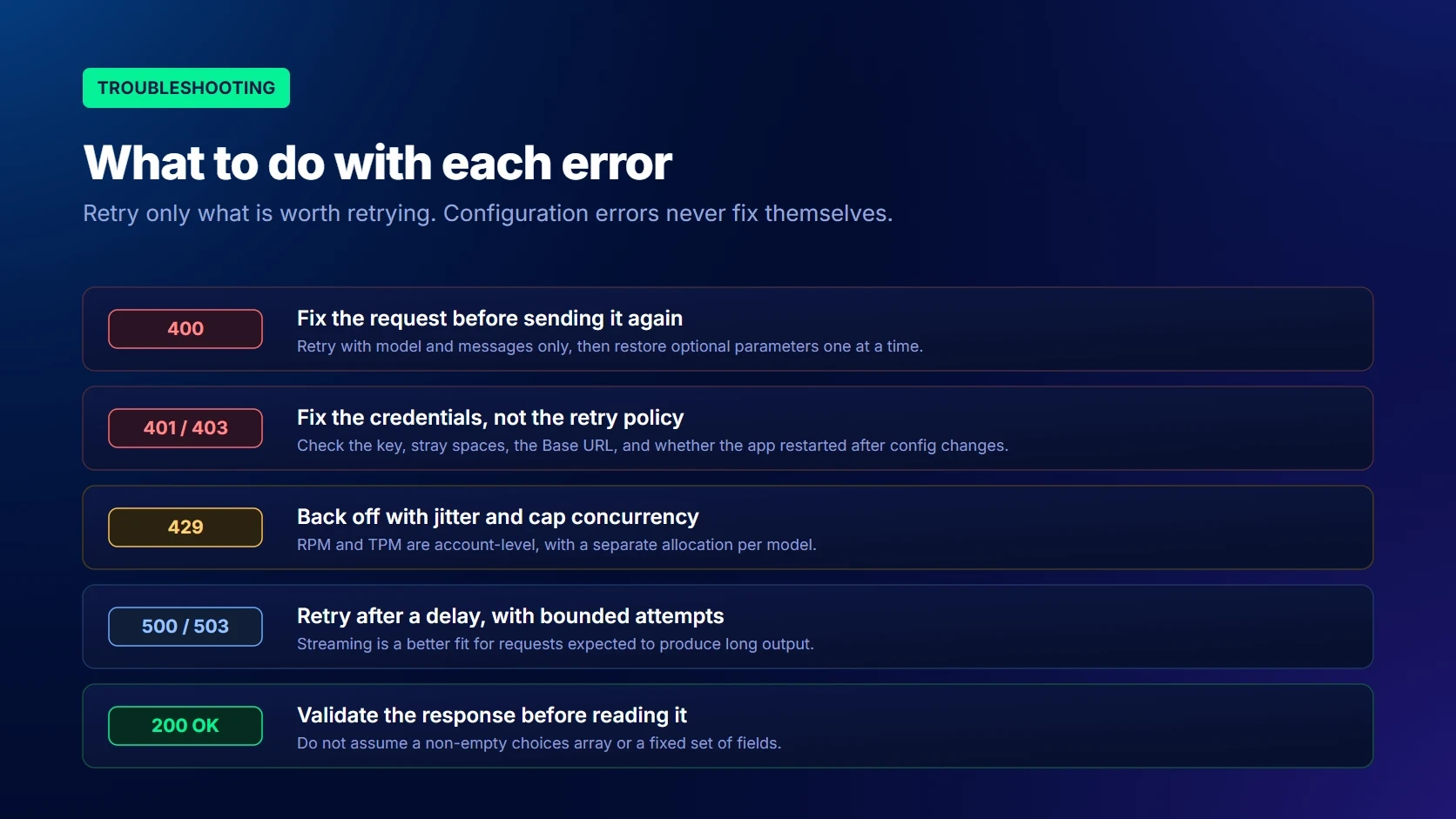
A 401 response usually indicates that the API key is missing, invalid, or unavailable.
Check:
Whether SILICONFLOW_API_KEY is loaded
Whether the key contains accidental spaces
Whether the correct global Base URL is configured
Whether the key belongs to the SiliconFlow platform
Whether the application was restarted after configuration changes
Model Not Found Errors
Model-related failures commonly result from:
Incorrect capitalization
A shortened model name
An outdated model ID
A model that is no longer available
A model that does not support the requested endpoint
Read the complete error message and compare the configured ID with the current Models page or /v1/models response.
Unsupported Request Parameters
According to SiliconFlow’s error-handling guide, a 400 response indicates incorrect request parameters. Read the complete error message first, because it may identify an invalid model ID, a missing required field, an unsupported parameter, or an incorrectly formatted value.
If the cause remains unclear, retry the request with only:
model
messages
Then restore optional parameters individually. This helps identify whether the failure is caused by tools, structured output settings, thinking controls, image inputs, or another unsupported field.
Unexpected Response Fields
A model may return additional fields such as reasoning_content. Parsers that reject all unknown fields can fail even when the response is valid.
Read only the fields the application needs and tolerate documented additions to the response structure.
Streaming Parsers That Expect Provider-Specific Chunks
A streaming parser may fail if it assumes that:
Every chunk contains a choice
Every choice contains text
Only delta.content can appear
The final event always has one fixed shape
Validate each chunk before reading nested fields and test the parser against the exact production model.
Rate Limits and Temporary Model Availability
A 429 response means that a rate limit has been triggered. SiliconFlow uses RPM and TPM limits for language models. Limits apply at the account level, while each model has a separate allocation.
If the existing limits do not meet your expected workload, sign in to SiliconFlow Cloud, select Higher Limits in the lower-left corner, and complete the SiliconFlow RPM and TPM Increase Request. Provide the requested information based on your actual usage requirements and expected traffic.
Use:
Exponential backoff with jitter
Client-side concurrency controls
Token-aware queues
Bounded retries
A suitable fallback model
For 503 or 504 responses, retry temporary failures after a delay. Streaming can also be more appropriate for requests expected to produce long outputs. SiliconFlow’s platform error guidance currently covers 400, 401, 403, 429, 500, and 503/504 responses.
Do not retry authentication failures, invalid parameters, or incorrect model IDs without changing the configuration.
Migration Checklist Before Going Into Production
Check
Requirement
Authentication
Load the API key securely
Base URL
Use https://api.siliconflow.com/v1 for the global platform
Model ID
Store the exact current model ID in configuration
Basic request
Confirm a minimal Chat Completions request succeeds
Parameters
Test every required optional parameter
Streaming
Handle empty chunks, interruptions, and reasoning fields
Function Calling
Validate tool names and arguments before execution
Structured data
Parse and validate JSON and schema-based outputs
Vision
Test image format, access, size, and model support
Reasoning
Handle final answers, reasoning fields, and thinking controls intentionally
Context
Test full production prompts and conversation history
Errors
Handle 400, 401, 403, 429, 500, 503, and 504 responses
Retries
Retry only temporary failures with bounded backoff
Cost
Measure token usage with representative requests
Monitoring
Log model ID, status, latency, request ID, and token usage
Frequently Asked Questions About How to Use the OpenAI SDK
Q1. Is SiliconFlow Fully Compatible With Every OpenAI API Feature?
No. SiliconFlow supports familiar OpenAI SDK patterns for Chat Completions, but endpoint coverage, parameters, response fields, and advanced capabilities still depend on the selected model.
Q2. Which SiliconFlow Base URL Should I Use?
Use the following endpoint for the global platform:
https://api.siliconflow.com/v1
The API key must come from the corresponding global SiliconFlow account.
Q3. Can One Application Support Both OpenAI and SiliconFlow?
Yes. Store the API key, Base URL, and model ID in provider configuration or environment variables. The application can then initialize the appropriate client while preserving its core prompt and message logic.
Provider-specific parameters and advanced features should still be tested separately.
Q4. Why Does a Parameter Work With One SiliconFlow Model but Not Another?
The API provides a consistent request layer, but the underlying models have different architectures and capabilities. Vision inputs, tool calls, reasoning controls, and structured output formats may only work with models that support those features.
Q5. Should I Change My Application Code or Only Its Configuration?
For a basic Chat Completions integration, changing the API key, Base URL, and model ID may be sufficient.
Code changes are more likely when the application depends on strict response parsing, advanced streaming, Function Calling, Structured Outputs, vision inputs, reasoning fields, or provider-specific error handling.
Connect to SiliconFlow Without Rewriting Your Core Application
Connecting an OpenAI SDK application to SiliconFlow usually requires configuration changes rather than a full rewrite. Keep the API key, base URL, and model ID outside the core application, begin with a minimal Chat Completions request, and test each advanced capability separately. This approach preserves a familiar development workflow while making it easier to evaluate different language and multimodal models. Before production, confirm current model support, token limits, error handling, latency, usage, and monitoring with requests that reflect the real workload.