Table of Contents
GLM-5.3-Flash is a practical starting point for high-volume coding, visual development, and workloads where API cost matters. For difficult text-only engineering, test GLM-5.3 and use it where a higher accepted-task rate justifies the additional token cost. On SiliconFlow, both models have a 1,049K-token context window and support tool calling, but only GLM-5.3-Flash is currently documented for image input.
The right choice therefore depends on more than the model name. Start with the input type, then consider task difficulty, validation coverage, output length, and the cost of retries or human correction.
GLM-5.3 and GLM-5.3-Flash: The Differences That Matter
GLM-5.3 is Z.ai’s flagship model for complex software engineering and long-horizon agent work. GLM-5.3-Flash uses a different, more compute-efficient architecture and adds native multimodal understanding. It is not simply GLM-5.3 with a lower reasoning setting.
The following comparison reflects the models available on SiliconFlow as of September 9, 2026.
Category | GLM-5.3 | GLM-5.3-Flash | Practical Implication |
|---|---|---|---|
SiliconFlow model ID | zai-org/GLM-5.3 | zai-org/GLM-5.3-Flash | You can switch models by changing the model ID in the same API workflow. |
Positioning | Flagship coding and agent model | Efficient multimodal coding and agent model | Use task difficulty and input type to choose, rather than treating Flash as an automatic downgrade. |
Architecture | 744B sparse Mixture of Experts | 320B hybrid Mixture of Experts with 18B active parameters | Flash is designed to reduce inference cost, especially across long contexts. |
Context length on SiliconFlow | 1,049K tokens | 1,049K tokens | Either model can accept large repositories or long agent histories, subject to practical request limits. |
Image input on SiliconFlow | Not supported | Supported | Flash can inspect screenshots, diagrams, and rendered interfaces without a separate vision model. |
Tool calling on SiliconFlow | Supported | Supported | Both can operate inside coding agents that expose functions and development tools. |
Input price | $1.40 per million tokens | $0.15 per million tokens | Flash is less expensive for repeated repository context. |
Cached-input price | $0.26 per million tokens | $0.03 per million tokens | Both reward reuse of stable prompts and code context, but at different rates. |
Output price | $4.40 per million tokens | $0.50 per million tokens | Long reasoning traces and code generation widen the cost difference. |
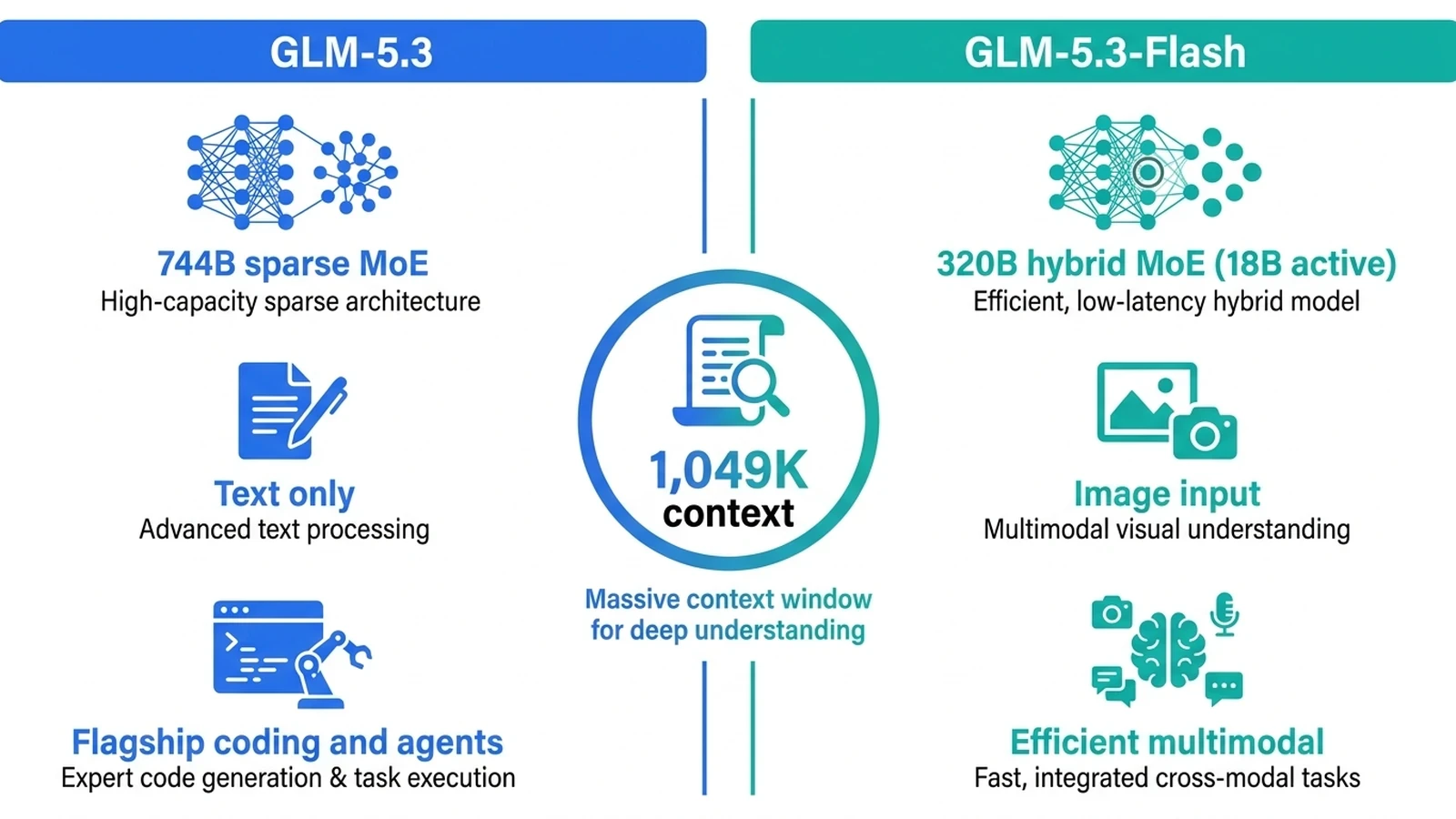
On SiliconFlow, you can access GLM-5.3 and GLM-5.3-Flash through the model IDs shown above. Check the latest token rates when forecasting production spend because pricing may change.
Architecture helps explain the price gap, but it does not determine which model will complete your own tasks successfully. A lower-cost model that triggers several retries, extensive developer correction, or an unnecessary escalation may cost more per accepted result. Conversely, paying for the flagship on every lint fix or test-generation request can waste budget without improving the final outcome.
How Image and Video Inputs Affect Your Choice
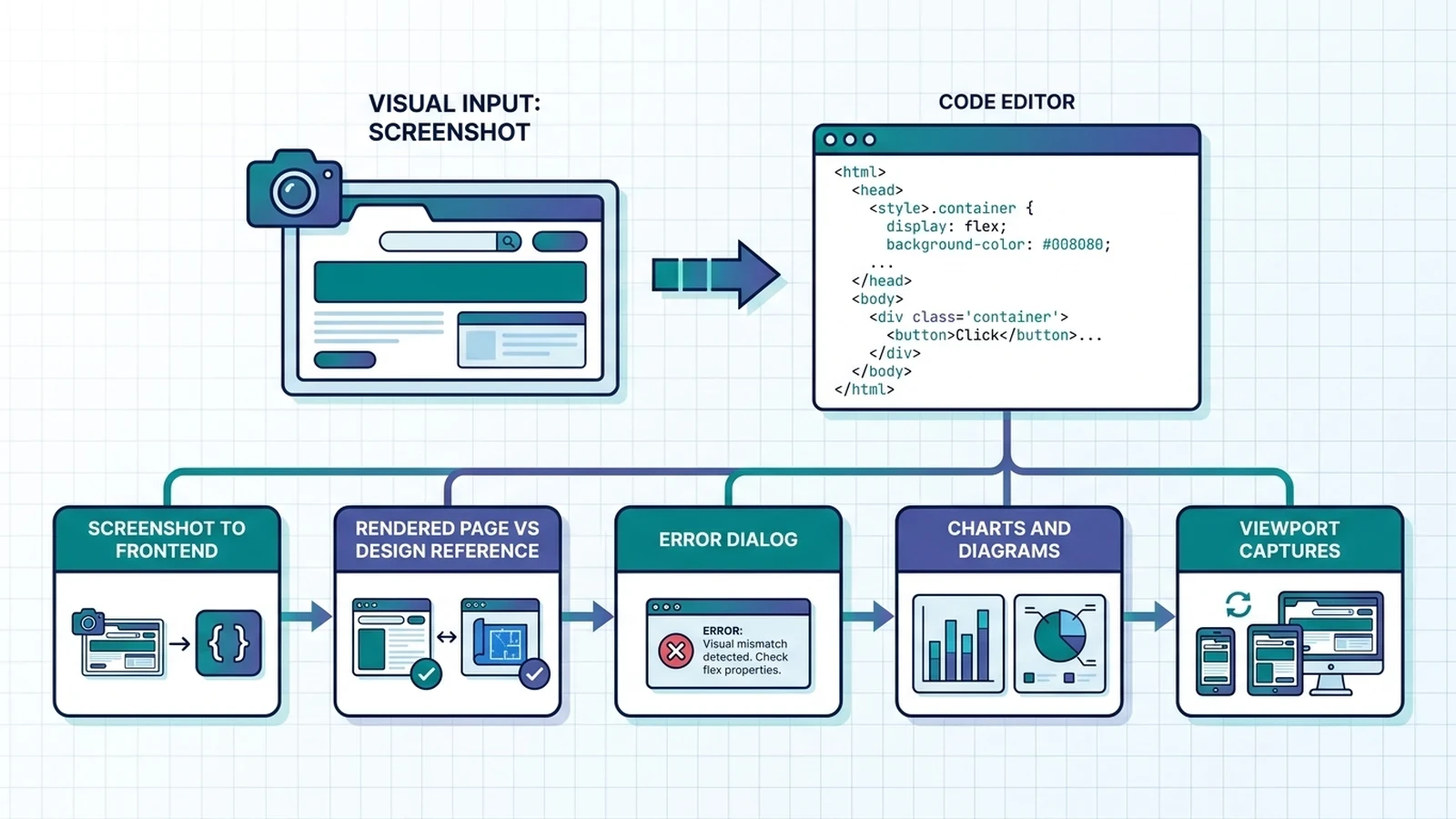
Input modality creates the clearest dividing line. GLM-5.3 accepts text, while the SiliconFlow deployment of GLM-5.3-Flash explicitly supports image input. That makes Flash the direct choice when the task depends on visual evidence. Useful image-driven coding tasks include:
Reproducing a frontend from approved screenshots
Comparing a rendered page with a design reference
Reading an error dialog that is unavailable as structured text
Inspecting charts, architecture diagrams, or visual test failures
Checking layout changes across several viewport captures
Images still need adequate context. A screenshot can show that a button is misplaced, but it may not reveal the component tree, breakpoint rules, or state that caused the problem. Include the relevant code, expected behavior, viewport size, and acceptance criteria with the image.
Video support requires more care. Z.ai’s GLM-5.3-Flash documentation describes the upstream model as accepting video, image, text, and file inputs. On SiliconFlow, GLM-5.3-Flash currently has documented image-input support, but a raw-video request format is not documented. Upstream capability should not be treated as proof that the same input format is enabled on every hosted endpoint.
For a production workflow on SiliconFlow, confirm video handling with the current API documentation and a small endpoint test before building around it. If raw video is not supported for the request path you use, extract representative frames and a timestamped transcript, then send that evidence to GLM-5.3-Flash. This approach also gives you more control over token use and the moments the model inspects.
GLM-5.3 can still participate in a visual workflow after preprocessing. Flash can first convert screenshots or frames into a structured defect report. GLM-5.3 can then reason over that text when the underlying fix spans several services or requires a difficult architectural decision.
Choosing a Model for Routine Coding and Complex Engineering
For GLM-5.3 vs. Flash for coding, the flagship leads several demanding software-engineering evaluations, while Flash performs better on selected tool-use and automation tests.
Benchmark | GLM-5.3 | GLM-5.3-Flash | What the Result Suggests |
|---|---|---|---|
88.2 | 84.3 | GLM-5.3 has the advantage on terminal-based agent tasks. | |
DeepSWE v1.1 | 66.9 | 63.4 | GLM-5.3 leads on software-engineering issue resolution. |
Toolathlon Verified | 73.0 | 78.4 | Flash performs better in this tool-use evaluation. |
AutomationBench v1.0.6 | 48.2 | 48.8 | The reported results are nearly level. |
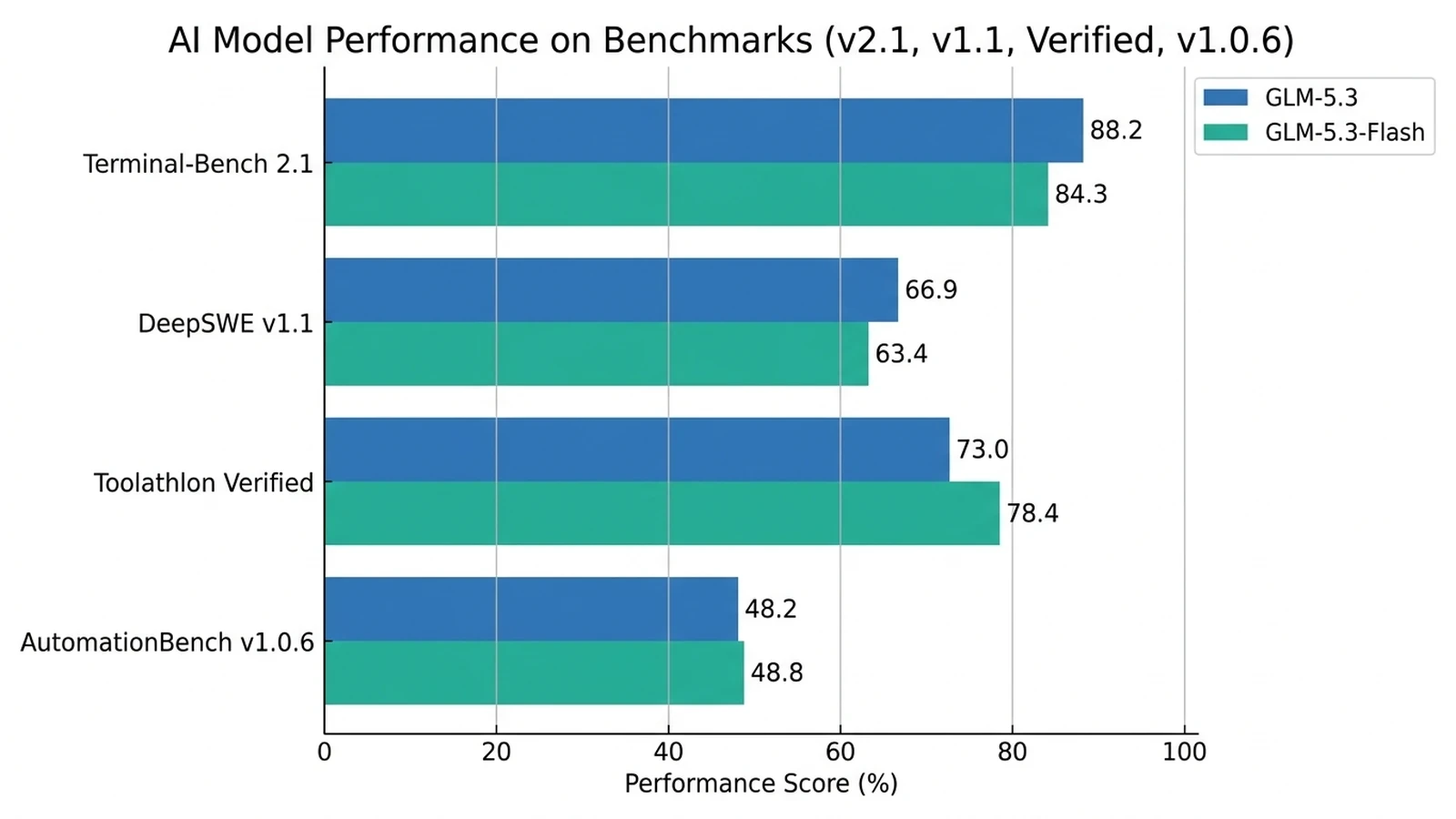
Z.ai’s GLM-5.3 and GLM-5.3-Flash model cards disclose matching principal settings for these evaluations. For example, both Terminal-Bench 2.1 results use Claude Code 2.1.207, the same sampling settings, a 65,536-token generation limit, and a six-hour timeout. The results are still vendor-reported, so use them as directional evidence and test both models with your own agent harness, tools, and task set.
Workload | Start With | Why |
|---|---|---|
Boilerplate, documentation, and unit-test generation | GLM-5.3-Flash | The work is usually easy to validate and sensitive to volume. |
Small, well-scoped refactors | GLM-5.3-Flash | Tests, type checks, and diff limits can catch many failures automatically. |
Screenshot-to-frontend implementation | GLM-5.3-Flash | The visual reference must remain available to the model. |
Issue triage and first-pass debugging | GLM-5.3-Flash | It can collect evidence cheaply before escalation. |
Cross-service failures with ambiguous causes | GLM-5.3 | The flagship’s stronger results on difficult engineering evaluations may justify the premium. |
Architecture changes with broad downstream effects | GLM-5.3 | Errors are expensive, and the task demands sustained reasoning across constraints. |
High-risk migration or security-sensitive review | GLM-5.3 with mandatory validation | Use the higher-capability model, but keep tests, scanners, and human approval in the loop. |
The important distinction is task verifiability. Flash is a strong default when a deterministic check can accept or reject its work. The flagship becomes more valuable when requirements are incomplete, failures are hard to detect, or a wrong decision can propagate across the system.
Create an internal evaluation set before moving production traffic. Include routine tickets, difficult incidents, long-context tasks, and known failure cases. Record first-pass success, retry count, input and output tokens, latency, developer correction time, and final acceptance. This shows whether the flagship reduces failures and corrections enough to justify its higher rates.
Comparing API Costs for the Same Workload
SiliconFlow’s current pay-as-you-go prices make GLM-5.3-Flash substantially cheaper per token. The actual budget difference depends on the balance of new input, cached input, and generated output.
For any model, the basic calculation is:
API cost = [(U * Pu) + (C * Pc) + (O * Po)] / 1,000,000
Here, U is uncached input tokens, C is cached input tokens, and O is output tokens. Pu, Pc, and Po are the corresponding prices per million uncached input, cached input, and output tokens.
Consider a hypothetical monthly workload of 1,000 coding jobs. Each job uses 100,000 input tokens and produces 10,000 output tokens. With no cached input, the comparison is:
Model | Input Cost for 100M Tokens | Output Cost for 10M Tokens | Total Monthly Cost |
|---|---|---|---|
GLM-5.3 | $140.00 | $44.00 | $184.00 |
GLM-5.3-Flash | $15.00 | $5.00 | $20.00 |
If 60% of the input is served at the cached-input rate, the same hypothetical workload becomes:
Model | 40M Uncached Input | 60M Cached Input | 10M Output | Total Monthly Cost |
|---|---|---|---|---|
GLM-5.3 | $56.00 | $15.60 | $44.00 | $115.60 |
GLM-5.3-Flash | $6.00 | $1.80 | $5.00 | $12.80 |
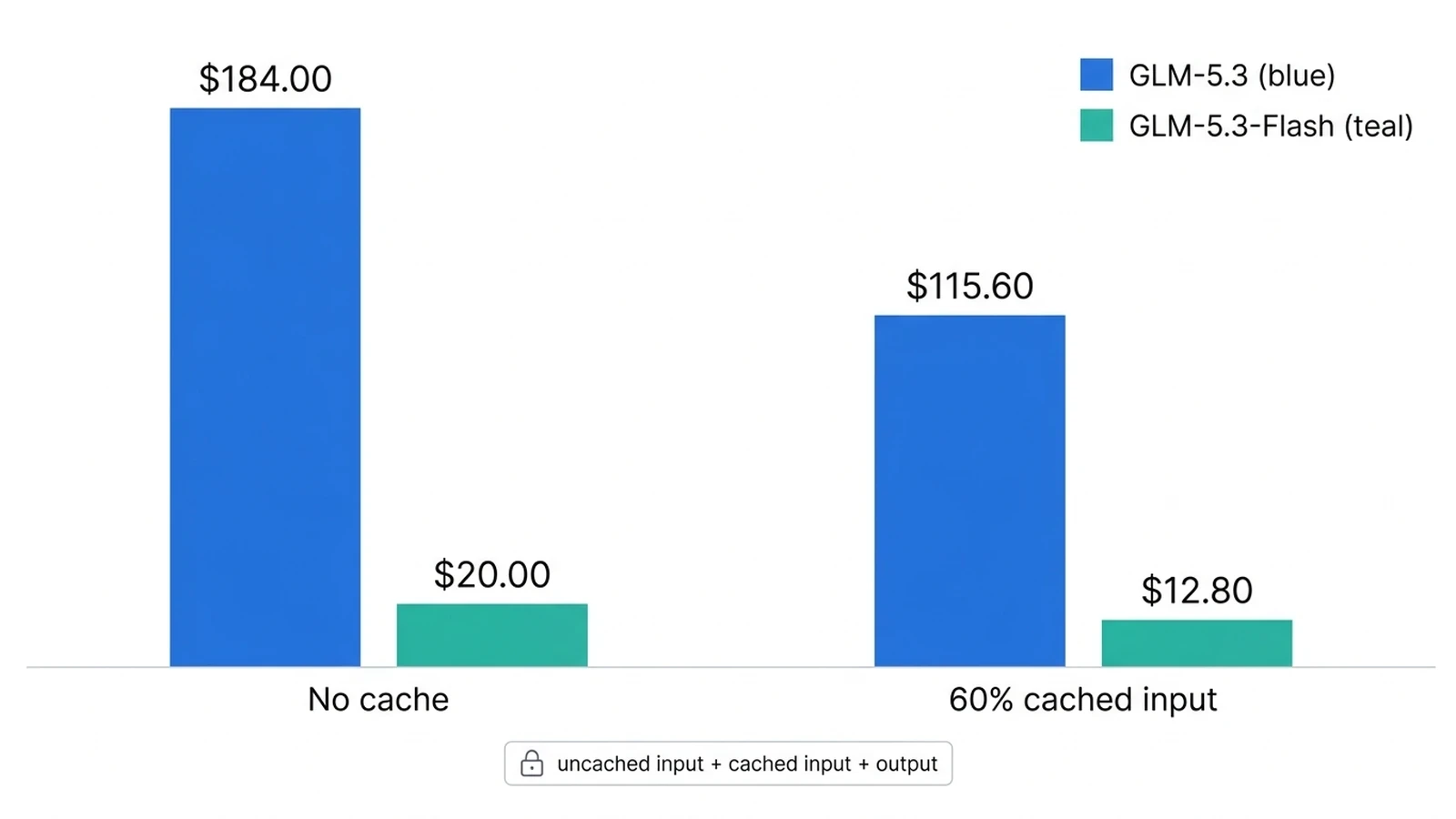
These figures compare identical token volumes. They do not assume that both models generate the same number of tokens or achieve the same acceptance rate. In a real agent, calculate the cost of every initial call, retry, and escalation, then divide the combined API spend by the number of accepted tasks:
Cost per accepted task = total cost of initial calls, retries, and escalations / number of accepted tasks
This second metric is more useful than token price alone. It captures cases where Flash completes a routine task on the first attempt, as well as cases where a difficult task reaches the flagship after a failed first pass.
When to Use One Model or Route Between Both
A two-model route can be more efficient than sending every task to the same model. It also creates a clear escalation path instead of asking developers to choose manually for every request.
Use the following routing sequence:
Classify the input. Send requests containing screenshots or other required visual evidence to GLM-5.3-Flash. Send text-only requests to the next decision.
Estimate task risk. Keep routine, reversible, and automatically testable work on Flash. Route high-impact architecture, security, data migration, or ambiguous multi-system text tasks to GLM-5.3. For high-risk visual tasks, Flash can extract the visual evidence before GLM-5.3 receives a text-based handoff.
Run deterministic checks. Use tests, linting, type checks, schema validation, security scans, and allowed-file or diff-size limits.
Escalate on evidence. Send failed checks, repeated tool loops, contradictory plans, or unresolved ambiguity to GLM-5.3 with the first model’s evidence and tool results.
Measure the complete route. Track total tokens and accepted outcomes across both calls. Do not evaluate the first model in isolation if escalation is part of the design.
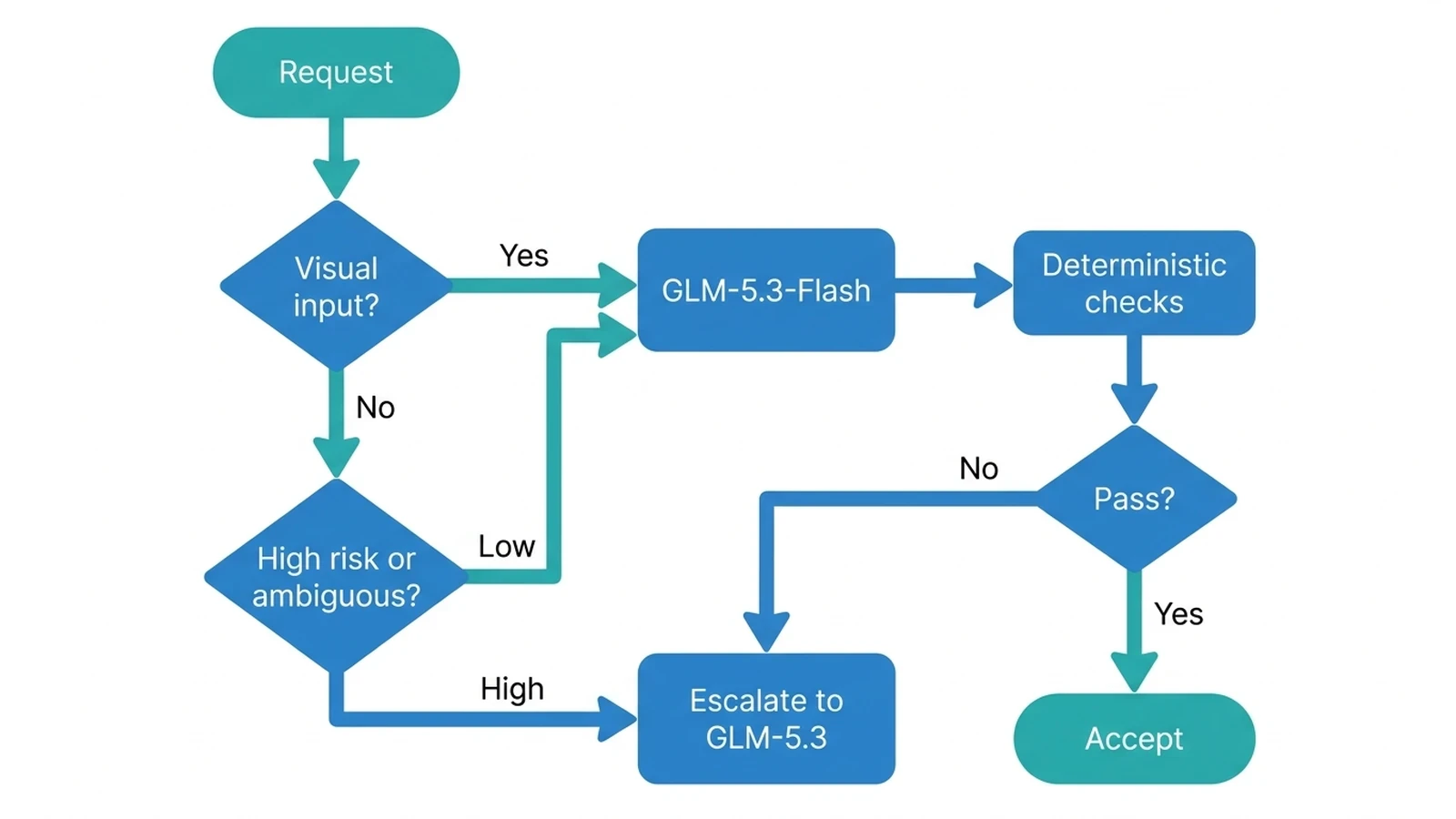
Both models are available through SiliconFlow’s OpenAI-compatible Chat Completions API. After visual requests have been routed separately, the following text-only example selects a model from task risk and prior results:
This example deliberately keeps acceptance logic outside the model call. Production systems should decide escalation from test results, policy checks, and task metadata rather than asking the first model whether its own answer is correct.
For most teams, the practical rule is simple: use GLM-5.3-Flash as the default lane, preserve it for tasks that require images, and promote difficult or failed text-only work to GLM-5.3. Revisit the thresholds when your task mix, prices, or model deployments change.
Common Questions About GLM-5.3 and GLM-5.3-Flash: The Differences That Matter
Q1. Can Either Model Be Fine-Tuned on SiliconFlow?
No. Fine-tuning and Serverless LoRA are not currently supported for the GLM-5.3 or GLM-5.3-Flash serverless deployments. Choose another supported deployment if adaptation is a firm requirement.
Q2. Can GLM-5.3-Flash Generate Images?
No. GLM-5.3-Flash can analyze supported visual inputs, but its documented output modality is text. Use an image-generation model when the required result is an image rather than code, an explanation, or structured text.
Q3. Can the Entire 1,049K Context Window Be Used for Input?
No. Input tokens and requested output must fit within the context window. SiliconFlow’s API guidance also recommends leaving roughly 10,000 tokens of buffer instead of setting max_tokens at the model’s upper limit.
Q4. How Should an Application Handle HTTP 429, 503, or 504 Responses?
Retry temporary failures with bounded exponential backoff and jitter. An HTTP 429 indicates a rate limit, while 503 or 504 responses can reflect temporary service or gateway problems. Cap retries and log persistent failures for investigation.