FLUX.2 Now on SiliconFlow: Designed for Real-world Creative Workflows
Table of Contents
Stop generating, start producing! We are excited to bring FLUX.2 [pro] and FLUX.2 [flex]to SiliconFlow, setting a new standard for real-world creative workflows. Moving beyond simple demos or party tricks, these models deliver photorealistic image generation, precise text rendering, and 4MP high-resolution editing capabilities.
Whether you need e-commerce product shots, on-brand ad creatives, designs with complex infographics, or consistent character illustrations for storytelling, FLUX.2 is ready to power your production-grade applications.
With SiliconFlow's FLUX.2 series API, you can expect:
Budget-Friendly Pricing:
FLUX.2 [pro] at $0.03/image.
FLUX.2 [flex] at $0.06/image.
Higher Resolution & Flexible Ratios: SiliconFlow Playground supports 5 standard ratios (1:1, 3:4, 4:3, 9:16, 16:9), while the API allows fully customizable resolutions via the image_size with image editing on resolutions up to 4MP.
Full Control ([flex]):inference_steps parameter (up to 50), giving developers full control over quality, prompt adherence, and speed.
With SiliconFlow's production-ready API at your fingertips, you can now harness the full power of FLUX.2 series. Now, let's explore how these models perform in real-world scenarios through detailed demos, help you decide which version to choose, and share prompting tips to maximize your output .
What's New about FLUX.2
Photorealism & World Knowledge
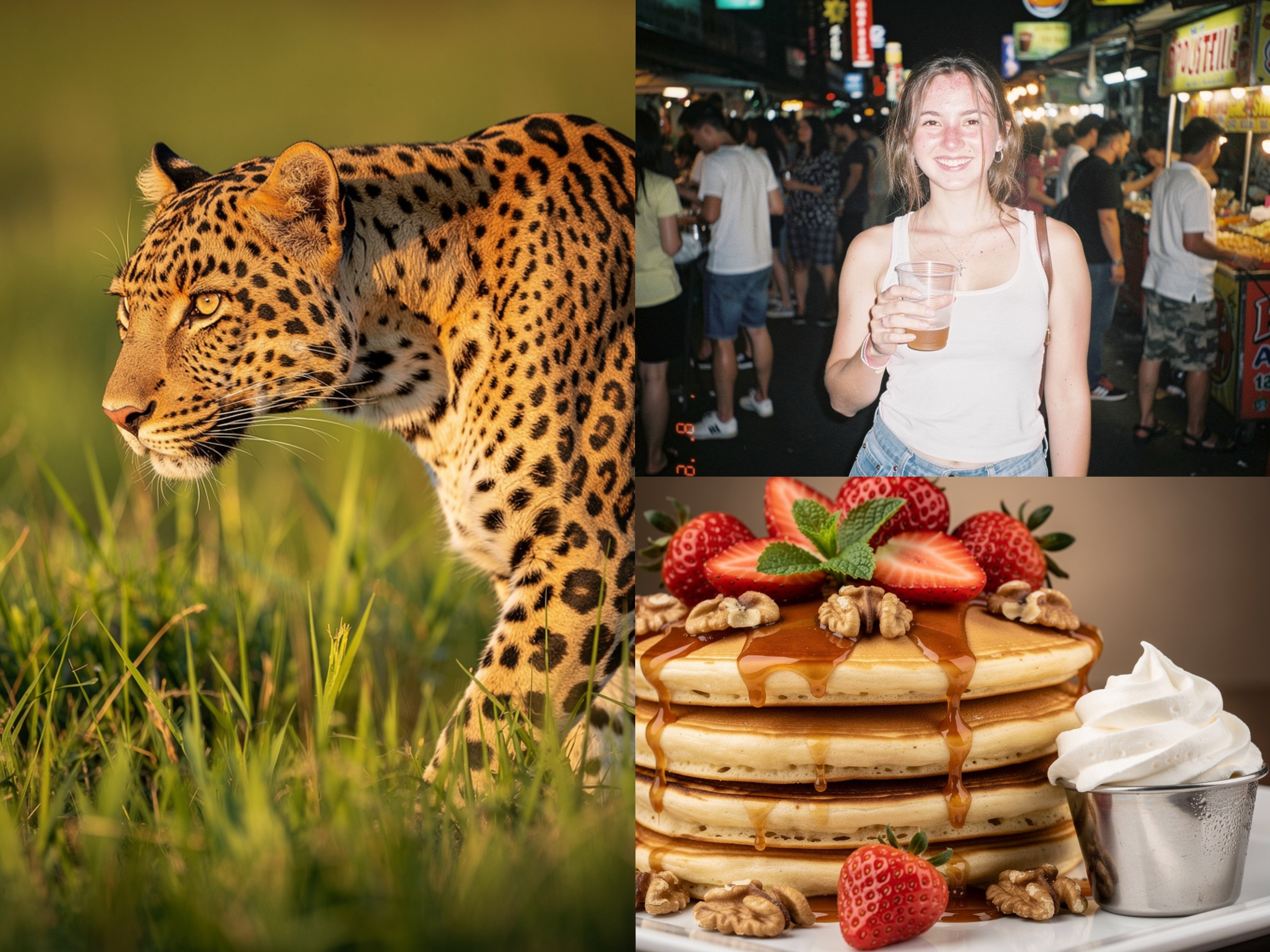
FLUX.2 is grounded in real-world spatial logic, resulting in coherent scenes where lighting and physics behave as expected. This foundation delivers sharper textures and greater detail, making it ideal for high-end product shots and professional visualization.
Real-world scenarios:
Product photography: Studio-quality shots without expensive photoshoots
Food & beverage: Appetizing product images for menus and marketing
Prompt used:
A clean,sharp,high dynamic range close-up profile photograph of a leopard walking through tall green grass. Shoton Sony A7IV.
Youngwoman out drinkinginBangkok at nightina street full of party folks,2000s digicam style,harsh flash,background fading.
Astack of fluffy pancakes on a white square plate,dripping withthick,glossy caramel sauce. Toppedwithfresh red strawberries,walnuts,and mint. Asilver cup of whipped cream sits to the side. Shoton Sony A7R IV witha 90mm Macro lens
A clean,sharp,high dynamic range close-up profile photograph of a leopard walking through tall green grass. Shoton Sony A7IV.
Youngwoman out drinkinginBangkok at nightina street full of party folks,2000s digicam style,harsh flash,background fading.
Astack of fluffy pancakes on a white square plate,dripping withthick,glossy caramel sauce. Toppedwithfresh red strawberries,walnuts,and mint. Asilver cup of whipped cream sits to the side. Shoton Sony A7R IV witha 90mm Macro lens
A clean,sharp,high dynamic range close-up profile photograph of a leopard walking through tall green grass. Shoton Sony A7IV.
Youngwoman out drinkinginBangkok at nightina street full of party folks,2000s digicam style,harsh flash,background fading.
Astack of fluffy pancakes on a white square plate,dripping withthick,glossy caramel sauce. Toppedwithfresh red strawberries,walnuts,and mint. Asilver cup of whipped cream sits to the side. Shoton Sony A7R IV witha 90mm Macro lens
Production-Ready Text Rendering
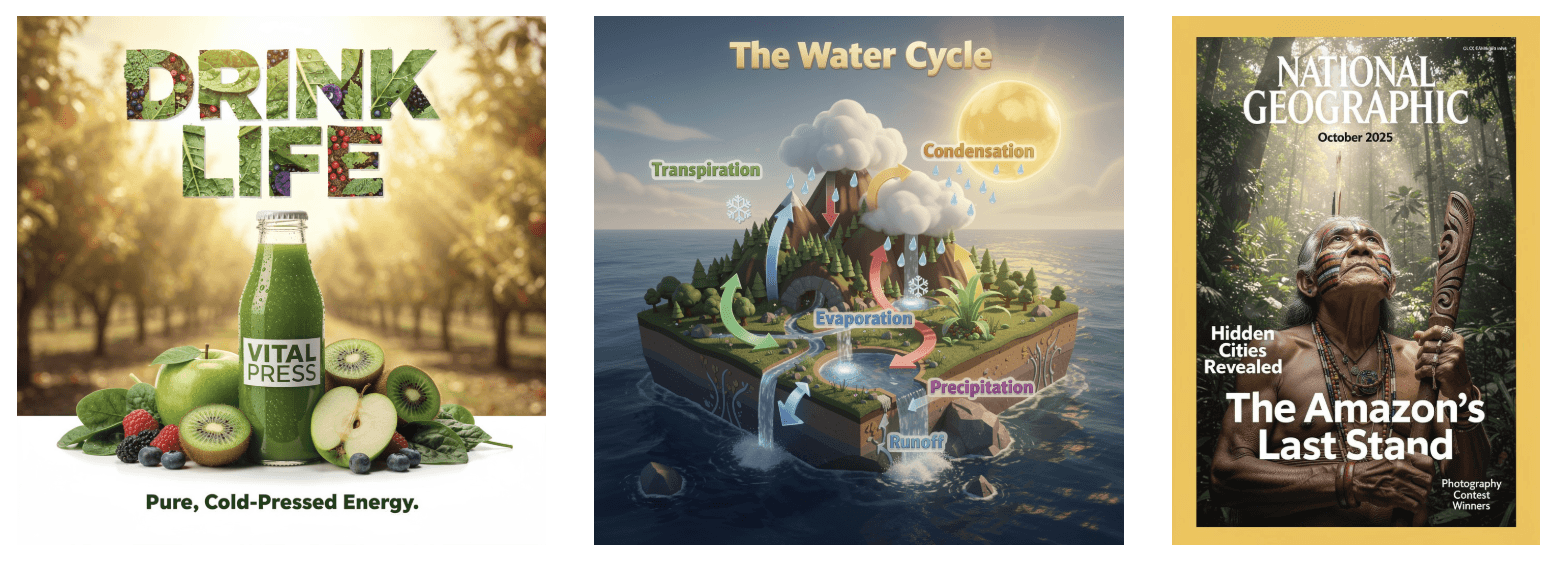
FLUX.2 finally solves the text rendering problem that has plagued image generation models, enabling the generation of complex typography, infographics and posters with legible fine text — reliably, in production.
Real-world scenarios:
Advertising: Create ad creatives with accurate headlines, taglines, and body copy
Social media: Generate covers and posters with readable text overlays
Infographics: Build data visualizations with clean, accurate labels
Prompt used:
Organic juice brand poster layout,'VITAL PRESS',‘DRINK LIFE’ main headlineinlarge leaf-textured typography at top,bottleof green juice withfruits,‘Pure,Cold-Pressed Energy.’tagline at bottomincolor #228B22,sunlit orchard background,clean promotional poster design withtext elements.
NationalGeographic magazine cover,October 2025issue,‘The Amazon’s Last Stand’ headline,indigenous elder withpainted face looking upwardina dense rainforest,holding a wooden staff,‘Hidden Cities Revealed’ feature text,‘Photography Contest Winners’ callout,professional editorial photography,magazine layout withmultiple text elementsEducational infographic illustration,"The Water Cycle",stylized isometric 3D floating island,lush sun-drenched Nintendo game style,deep azure ocean,rich brown mountains,vibrant greens,golden glowing sun,warm golden hour sunlight,soft colorful shadows,magical atmosphere,clear bright 3D arrows and labels
Organic juice brand poster layout,'VITAL PRESS',‘DRINK LIFE’ main headlineinlarge leaf-textured typography at top,bottleof green juice withfruits,‘Pure,Cold-Pressed Energy.’tagline at bottomincolor #228B22,sunlit orchard background,clean promotional poster design withtext elements.
NationalGeographic magazine cover,October 2025issue,‘The Amazon’s Last Stand’ headline,indigenous elder withpainted face looking upwardina dense rainforest,holding a wooden staff,‘Hidden Cities Revealed’ feature text,‘Photography Contest Winners’ callout,professional editorial photography,magazine layout withmultiple text elementsEducational infographic illustration,"The Water Cycle",stylized isometric 3D floating island,lush sun-drenched Nintendo game style,deep azure ocean,rich brown mountains,vibrant greens,golden glowing sun,warm golden hour sunlight,soft colorful shadows,magical atmosphere,clear bright 3D arrows and labels
Organic juice brand poster layout,'VITAL PRESS',‘DRINK LIFE’ main headlineinlarge leaf-textured typography at top,bottleof green juice withfruits,‘Pure,Cold-Pressed Energy.’tagline at bottomincolor #228B22,sunlit orchard background,clean promotional poster design withtext elements.
NationalGeographic magazine cover,October 2025issue,‘The Amazon’s Last Stand’ headline,indigenous elder withpainted face looking upwardina dense rainforest,holding a wooden staff,‘Hidden Cities Revealed’ feature text,‘Photography Contest Winners’ callout,professional editorial photography,magazine layout withmultiple text elementsEducational infographic illustration,"The Water Cycle",stylized isometric 3D floating island,lush sun-drenched Nintendo game style,deep azure ocean,rich brown mountains,vibrant greens,golden glowing sun,warm golden hour sunlight,soft colorful shadows,magical atmosphere,clear bright 3D arrows and labels
High-Resolution Editing (4MP)
Edit images at up to 4 megapixels while preserving detail and coherence — ideal for professional-grade outputs that require high resolution.
Real-world scenarios:
Print advertising: High-resolution assets for billboards and magazines
Large-format displays: Digital signage and exhibition graphics
Professional retouching: Detailed edits without quality loss
Which One to Choose: pro vs. flex
Dimension
FLUX.2 [pro]
FLUX.2 [flex]
Core Strength
Prompt adherence and visual fidelity
Text and fine details rendering
Speed
No compromise between speed and quality
Full control over quality, prompt adherence and speed
Best For
Production workflows
Maximum quality
Controls
Standard
Adjustable steps & guidance
Pricing
$0.03/image
$0.06/image
FLUX.2 Prompting Tips
Prompting Framework
For consistent, high-quality results, structure your prompts using this logic flow. Prioritize elements from left to right:
To achieve true photorealism, move beyond generic terms like "professional photo." Instead, specify camera models, lenses, and film stocks to trigger specific visual aesthetics.
Style
Key Descriptors
Modern Digital
”shot on Sony A7IV, clean sharp, high dynamic range”
”film grain, warm color cast, soft focus, 80s vintage photo”
Analog Film
”shot on Kodak Portra 400, natural grain, organic colors”
Multi-Language Prompting
FLUX.2 isn't limited to English. For the best cultural accuracy, prompt in your target language. Describing a scene in its native tongue helps the model capture the subtle "vibe" of local architecture and atmosphere that translation often misses.
The official guide provides technical specifications for broader capabilities, including JSON structured prompts, precise color control, and text rendering tips. More information: FLUX.2 Prompting Guide
importrequestsurl = "https://api.siliconflow.com/v1/images/generations"payload = {"model": "black-forest-labs/FLUX.2-pro","prompt": "an island near sea, with seagulls, moon shining over the sea, light house, boats int he background, fish flying over the sea","image_size": "1024x1024","batch_size": 1,"seed": 4999999999,"output_format": "png",}headers = {"Authorization": "Bearer <YOUR_API_KEY>","Content-Type": "application/json"}response = requests.post(url,json=payload,headers=headers)print(response.text)
importrequestsurl = "https://api.siliconflow.com/v1/images/generations"payload = {"model": "black-forest-labs/FLUX.2-pro","prompt": "an island near sea, with seagulls, moon shining over the sea, light house, boats int he background, fish flying over the sea","image_size": "1024x1024","batch_size": 1,"seed": 4999999999,"output_format": "png",}headers = {"Authorization": "Bearer <YOUR_API_KEY>","Content-Type": "application/json"}response = requests.post(url,json=payload,headers=headers)print(response.text)
importrequestsurl = "https://api.siliconflow.com/v1/images/generations"payload = {"model": "black-forest-labs/FLUX.2-pro","prompt": "an island near sea, with seagulls, moon shining over the sea, light house, boats int he background, fish flying over the sea","image_size": "1024x1024","batch_size": 1,"seed": 4999999999,"output_format": "png",}headers = {"Authorization": "Bearer <YOUR_API_KEY>","Content-Type": "application/json"}response = requests.post(url,json=payload,headers=headers)print(response.text)