目錄

As an AI application moves from testing to production, inference infrastructure becomes a cost, capacity, and reliability decision. Serverless inference is flexible when demand is uncertain, while reserved GPUs can provide more predictable capacity for sustained workloads. Neither option is automatically better. The right choice depends on traffic patterns, GPU utilization, latency requirements, operational resources, and deployment control. With SiliconFlow, teams can start with pay-as-you-go model access and evaluate reserved capacity after real workload data becomes available.
What Is Serverless Inference?
Serverless inference lets developers call AI models through an API without provisioning or maintaining the underlying GPU infrastructure.
SiliconFlow Serverless Inference manages resource allocation and scaling behind the API. Teams pay according to actual model usage rather than maintaining continuously allocated GPU capacity. This makes it easier to launch an AI feature before request volume and infrastructure requirements are fully known.
Serverless inference is usually a strong fit for:
Prototypes and early product validation
Applications with variable or intermittent traffic
Teams testing multiple models
Seasonal or event-driven workloads
Small teams without dedicated GPU operations staff
Serverless is not limited to demos. A production application may continue using serverless inference when traffic remains uneven or when long idle periods would leave reserved resources underused.
SiliconFlow also supports REST API access and OpenAI-compatible calling patterns for supported models. This allows developers to use familiar integration methods while accessing models through a unified API.
What Are Reserved GPUs?
Reserved GPUs provide dedicated, always-on compute capacity for workloads that require more predictable resources.
SiliconFlow Reserved GPU instances allow teams to reserve a specified quantity and model of GPU in a selected region. This can reduce capacity uncertainty for long-running production services and make infrastructure spending easier to forecast.
Reserved GPUs are most relevant for:
High-volume applications with sustained inference demand
Workloads with predictable baseline and peak traffic
Services that need a defined amount of GPU capacity
Custom models or containerized inference services
Teams that require specific GPU configurations
Production systems with stricter capacity requirements
Reserved capacity still requires planning. Teams need to estimate model memory, request concurrency, throughput, redundancy, and expected growth. They may also need to configure container images, health checks, service ports, instance quantities, monitoring, and model updates, depending on the deployment arrangement.
Serverless Inference vs Reserved GPUs: Key Differences
Searches for "serverless inference vs dedicated GPU" often focus on hardware access, but the more important differences involve cost structure, scaling, resource predictability, and operational responsibility.

Dimension | Serverless Inference | Reserved GPUs |
|---|---|---|
Billing | Pay for model calls | Full monthly cost of hardware, unused resources, deployment work, monitoring, and redundancy |
Scaling | Platform handles infrastructure scaling | Teams plan capacity and adjust instance quantities |
Capacity | No need to reserve hardware for every possible peak | Dedicated, always-on compute capacity |
Operations | No GPU provisioning or model servers | Container images, health checks, logs, model versions |
Best fit | Variable or intermittent traffic | Sustained, predictable inference demand |
Cost Model
Serverless inference is often more economical when usage is irregular. Teams pay for model calls without carrying the cost of idle GPU capacity.
Reserved GPUs may become more efficient when demand is sustained and the allocated hardware remains productively utilized. However, a high monthly API bill does not automatically mean reserved capacity will cost less.
A useful AI inference cost comparison should consider:
Input and output token volume
Average context and response length
Model selection
Peak concurrency
GPU type and quantity
Average GPU utilization
Batching efficiency
Idle capacity
Monitoring and engineering costs
Compare both options using the same business unit. Depending on the application, this could be cost per completed agent task, processed document, generated image, or successful customer interaction.
For reserved capacity, include the full monthly cost of hardware, unused resources, deployment work, monitoring, and redundancy. Comparing API spending only with the GPU rental price can produce a misleading result.
Scaling and Capacity Planning
Serverless inference is useful when traffic may rise suddenly or when future demand is difficult to forecast. The platform handles infrastructure scaling, so teams do not need to reserve enough hardware for every possible peak.
Reserved GPUs require more deliberate planning. Too little capacity can create request queues. Too much capacity lowers utilization and increases the cost per task.
SiliconFlow GPU cloud containers allow teams to adjust instance quantities, update container images, and switch GPU specifications as workload needs change. This provides control, but it also requires teams to understand their capacity requirements.
Performance Consistency
Reserved GPUs provide a more predictable compute base because capacity is allocated to the workload. They do not, however, guarantee lower latency in every situation.
Inference performance also depends on:
Model architecture and size
Prompt and context length
Output length
GPU memory and compute capability
Request concurrency
Serving software
Queue management
Network conditions
Teams should monitor more than average response time. Useful production metrics include:
Time to First Token
Tokens per second
p50, p95, and p99 latency
Queue time
Request failure rate
Throughput at peak concurrency
A reserved GPU can improve resource predictability while still performing poorly if the serving configuration is inefficient.
Operational Effort
Serverless inference removes the need to provision GPUs and operate model servers. Production applications still require API monitoring, timeout handling, retries, cost controls, and error recovery.
Reserved GPU deployments involve more infrastructure responsibility. Depending on the setup, teams may need to manage:
Container images
GPU and instance configurations
Scaling decisions
Logs and monitoring
Model versions
Service availability
The infrastructure decision should therefore consider engineering capacity as well as compute cost.
How Do You Know When to Move From Serverless to Reserved Capacity?
There is no universal request volume, token count, or monthly spending threshold for moving to reserved GPUs. The break-even point changes with the model, workload, GPU type, and serving configuration.
Look for several signals together rather than relying on one metric.
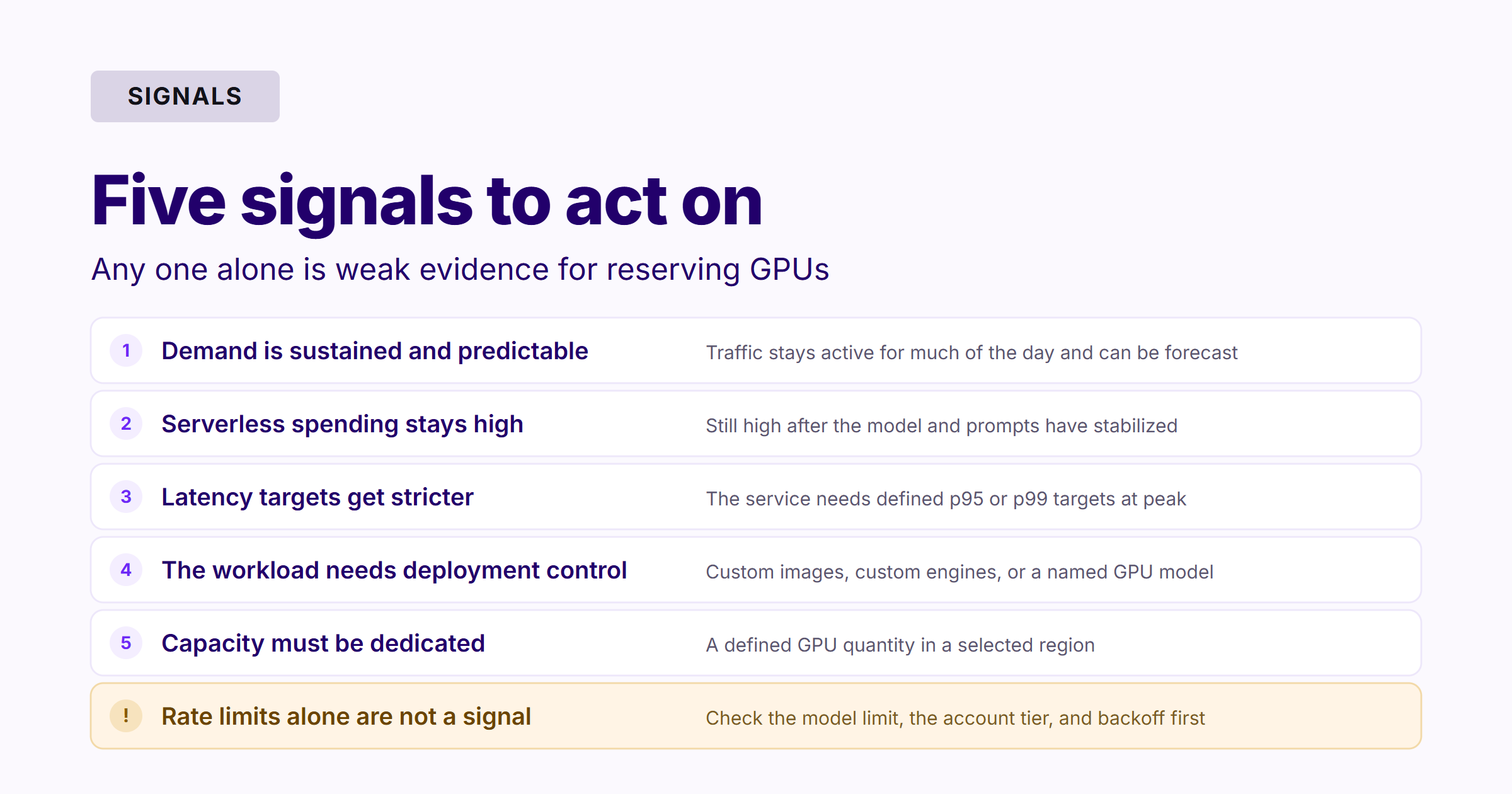
Demand Is Sustained and Predictable
Monthly volume alone is not enough. Ten million tokens spread evenly across every day create a different infrastructure requirement from ten million tokens generated during one short event.
Reserved capacity becomes more attractive when inference demand remains active for much of the day and historical traffic can support a reliable capacity forecast.
Serverless Spending Remains High for a Stable Workload
Review whether monthly serverless spending remains consistently high after the model, prompt structure, and traffic pattern have stabilized.
Then compare:
Serverless cost per completed task
Expected GPU utilization
Fully loaded reserved-capacity cost
Engineering and monitoring overhead
Cost of unused capacity
Expected growth
Reserved GPUs deserve consideration when the same sustained workload can keep the allocated resources well utilized. They should not be selected only because total API spending increased alongside user growth.
Latency or Capacity Requirements Become Stricter
A prototype may tolerate occasional slow responses. A customer-facing production service may need defined p95 or p99 latency targets and reliable capacity during peak periods.
Reserved GPUs can provide a more controllable resource base. Teams should still benchmark the actual model, concurrency level, and serving configuration before changing infrastructure.
The Workload Needs More Deployment Control
Reserved resources may be appropriate when a team needs:
A specified GPU model or quantity
A custom container image
A custom model or inference engine
A controlled runtime environment
Dedicated compute capacity
Custom scaling or deployment configurations
SiliconFlow GPU cloud containers support configurable images, GPU specifications, instance quantities, health checks, ports, and logging.
Rate Limits Regularly Affect Production Requests
SiliconFlow applies model- and account-level Rate Limits using metrics such as requests per minute and tokens per minute. Paid-model limits may increase with account usage tiers, while some models use fixed limits.
Repeated 429 responses do not automatically mean an application needs reserved GPUs. First check:
The model-specific limit
The current account tier
Retry and backoff behavior
Request batching
Token usage
Traffic distribution
Whether a higher usage tier is available
Reserved or tailored capacity becomes relevant when Rate Limit pressure is combined with sustained demand and a need for dedicated resources.
What Should You Measure Before Reserving GPUs?
Collect enough production data to estimate both baseline and peak capacity.
Several weeks of representative production data are usually more useful than a short benchmark performed under ideal conditions.
Three Practical Workload Examples

A New AI Chat Feature
A team is testing several language models and does not know how many users will adopt the feature. Traffic has large peaks followed by long idle periods.
Better starting point: Serverless Inference.
The team can launch without reserving GPUs, compare models, and collect real usage data before making a longer-term commitment.
A Stable Production Assistant
An application uses one established model throughout the day. Request volume, concurrency, token usage, and p95 latency requirements have become predictable.
Next step: Evaluate Reserved GPUs.
The team can compare current serverless cost per completed task with the fully loaded cost of reserved capacity at the expected utilization level.
Nightly Document Processing
A business processes a large collection of documents overnight, but the results are not needed immediately.
Consider Batch API before reserving always-on GPUs.
SiliconFlow Batch API operates separately from online Rate Limits and is designed for non-real-time tasks such as evaluation, classification, extraction, and document processing. This can be more suitable than maintaining dedicated capacity for a workload that only runs during limited hours.
Choosing the Right SiliconFlow Deployment Option
The choice between serverless inference and reserved GPUs does not need to be permanent.
A practical path is to begin with SiliconFlow Serverless Inference, integrate supported models through a unified API, and measure real production behavior. Track cost per task, traffic variability, latency percentiles, Rate Limit pressure, and model usage before reserving infrastructure.
When demand becomes sustained and predictable, SiliconFlow Reserved GPUs provide dedicated, always-on capacity with more control over GPU resources and the deployment environment. For non-urgent offline workloads, Batch API provides another option without consuming online Rate Limits. AI Gateway can further support unified access, routing, Rate Limit management, and cost control as the application stack grows.
This flexibility allows teams to match infrastructure to the workload they have today while retaining options as performance, scale, and control requirements evolve.
FAQs
How Do You Calculate the Break-Even Point Between Serverless Inference and Reserved GPUs?
Compare serverless spending and reserved-capacity costs using the same unit, such as cost per processed document or completed agent task. Include GPU utilization, idle capacity, engineering work, monitoring, redundancy, and expected growth rather than comparing API charges with hardware prices alone.
Can Serverless Inference Support a Production LLM Application?
Yes. Serverless inference can support production applications when traffic is variable, intermittent, or difficult to predict. The decision should depend on cost, latency, capacity, and Rate Limit requirements rather than whether the application is labeled a prototype or a production service.
What Data Should You Collect Before Reserving GPUs?
Collect request and token volume, peak concurrency, context length, output length, hourly traffic, p95 and p99 latency, failure rates, model usage, and cost per completed task. These metrics help estimate capacity requirements and the amount of time reserved hardware may remain idle.
Should Offline Batch Inference Use Reserved GPUs?
Not necessarily. Workloads that do not require immediate responses may be better suited to Batch API. Reserved GPUs become more relevant when batch processing is continuous, requires a custom environment, or needs dedicated compute beyond the capabilities of a managed batch service.
Do Reserved GPUs Automatically Remove API Rate Limits?
Do not assume every reserved GPU arrangement removes all API limits. SiliconFlow Serverless Rate Limits are model- and account-based, while dedicated instances typically do not use standard Rate Limits. Confirm the behavior of the selected deployment option before designing production capacity.