How to Use an AI Video Generation API: Submit Jobs, Poll Status, and Store Results
Table of Contents
A video generation API usually does not return a finished file in the initial response. Video inference takes longer than text generation and may require queued compute resources before processing begins. With SiliconFlow, your application submits a generation request, receives a requestId, checks the task status, and downloads the result when generation succeeds. This asynchronous workflow supports text-to-video and image-to-video applications without requiring you to deploy or maintain the underlying video models.
Why Are AI Video APIs Usually Asynchronous?
A text response can often be generated within one HTTP request. Video generation involves more computation and produces a much larger output, so keeping the original connection open until completion is less reliable.
A long-running connection may be interrupted by:
Client or gateway timeouts
Temporary network failures
Variable queue and processing times
Application restarts
Large result transfers
An asynchronous video generation API separates job submission from result retrieval. Your application submits the request first, stores the returned identifier, and checks the result through a separate endpoint.
This approach lets a web request finish quickly while a worker monitors the video job independently. It also makes it easier to recover interrupted tasks without submitting the same generation request again.
How Does the SiliconFlow Video Generation API Workflow Work?
Keep production keys out of source code, public repositories, frontend bundles, and application logs.
Select the Video Generation Model
SiliconFlow provides ready-to-use access to video models through Serverless Inference, so developers can add generation capabilities without provisioning a separate GPU environment.
Both models are currently available through SiliconFlow Serverless. Model availability may change, so production applications should confirm the active model ID before deployment.
Write a Clear Video Prompt
A useful video prompt should explain what happens over time, not only what the scene contains.
Include details such as:
The main subject
The primary action
The order of events
The environment
Camera position or movement
Lighting when relevant
For example:
A small research drone flies above a green valley at sunrise.
Thecamera follows from behind withsteady forward movement.
Softmorning light passes through low clouds
A small research drone flies above a green valley at sunrise.
Thecamera follows from behind withsteady forward movement.
Softmorning light passes through low clouds
A small research drone flies above a green valley at sunrise.
Thecamera follows from behind withsteady forward movement.
Softmorning light passes through low clouds
Keep the description focused and chronological. SiliconFlow recommends writing the prompt as one cohesive paragraph, beginning with the main action and keeping it within 200 words.
How Do Text-to-Video and Image-to-Video Requests Differ?
Both workflows use the same submission and status endpoints. Their main difference is the generation input.
Text-to-Video API Integration
A text-to-video request creates the scene from a written prompt.
text_to_video_payload = {"model": "Wan-AI/Wan2.2-T2V-A14B","prompt": ("A small research drone flies above a green valley at sunrise. ""The camera follows from behind with steady forward movement. ""Soft morning light passes through low clouds."),"image_size": "1280x720","negative_prompt": ("flickering, distorted landscape, unstable camera"),"seed": 123456,}
text_to_video_payload = {"model": "Wan-AI/Wan2.2-T2V-A14B","prompt": ("A small research drone flies above a green valley at sunrise. ""The camera follows from behind with steady forward movement. ""Soft morning light passes through low clouds."),"image_size": "1280x720","negative_prompt": ("flickering, distorted landscape, unstable camera"),"seed": 123456,}
text_to_video_payload = {"model": "Wan-AI/Wan2.2-T2V-A14B","prompt": ("A small research drone flies above a green valley at sunrise. ""The camera follows from behind with steady forward movement. ""Soft morning light passes through low clouds."),"image_size": "1280x720","negative_prompt": ("flickering, distorted landscape, unstable camera"),"seed": 123456,}
Current text-to-video size options include:
Format
image_size
Landscape
1280x720
Portrait
720x1280
Square
960x960
The seed is optional. Save it with the result when you need a record of the generation settings.
Image-to-Video API Workflow
An image-to-video request starts from an existing image. The prompt should focus on motion, camera behavior, and changes that should occur after the first frame.
image_to_video_payload = {"model": "Wan-AI/Wan2.2-I2V-A14B","prompt": ("The camera slowly moves forward. Clouds drift across the sky, ""and the grass moves gently in the wind."),"image": "https://example.com/source-image.jpg","negative_prompt": ("flickering, warped objects, sudden camera movement"),"seed": 123456,}
image_to_video_payload = {"model": "Wan-AI/Wan2.2-I2V-A14B","prompt": ("The camera slowly moves forward. Clouds drift across the sky, ""and the grass moves gently in the wind."),"image": "https://example.com/source-image.jpg","negative_prompt": ("flickering, warped objects, sudden camera movement"),"seed": 123456,}
image_to_video_payload = {"model": "Wan-AI/Wan2.2-I2V-A14B","prompt": ("The camera slowly moves forward. Clouds drift across the sky, ""and the grass moves gently in the wind."),"image": "https://example.com/source-image.jpg","negative_prompt": ("flickering, warped objects, sudden camera movement"),"seed": 123456,}
The source image can also be supplied in a supported Base64 data URI format when appropriate for the request schema.
For image-to-video generation, output resolution is matched automatically to the uploaded image's aspect ratio:
Source Image Ratio
Output Resolution
16:9
1280 × 720
9:16
720 × 1280
1:1
960 × 960
Use a source image with one of these ratios to reduce unexpected cropping or layout changes. Do not manually add image_size to the image-to-video payload unless the current API schema for the selected model requires it.
How to Poll Video Status Without Sending Excessive Requests
Polling should update the application without sending continuous requests.
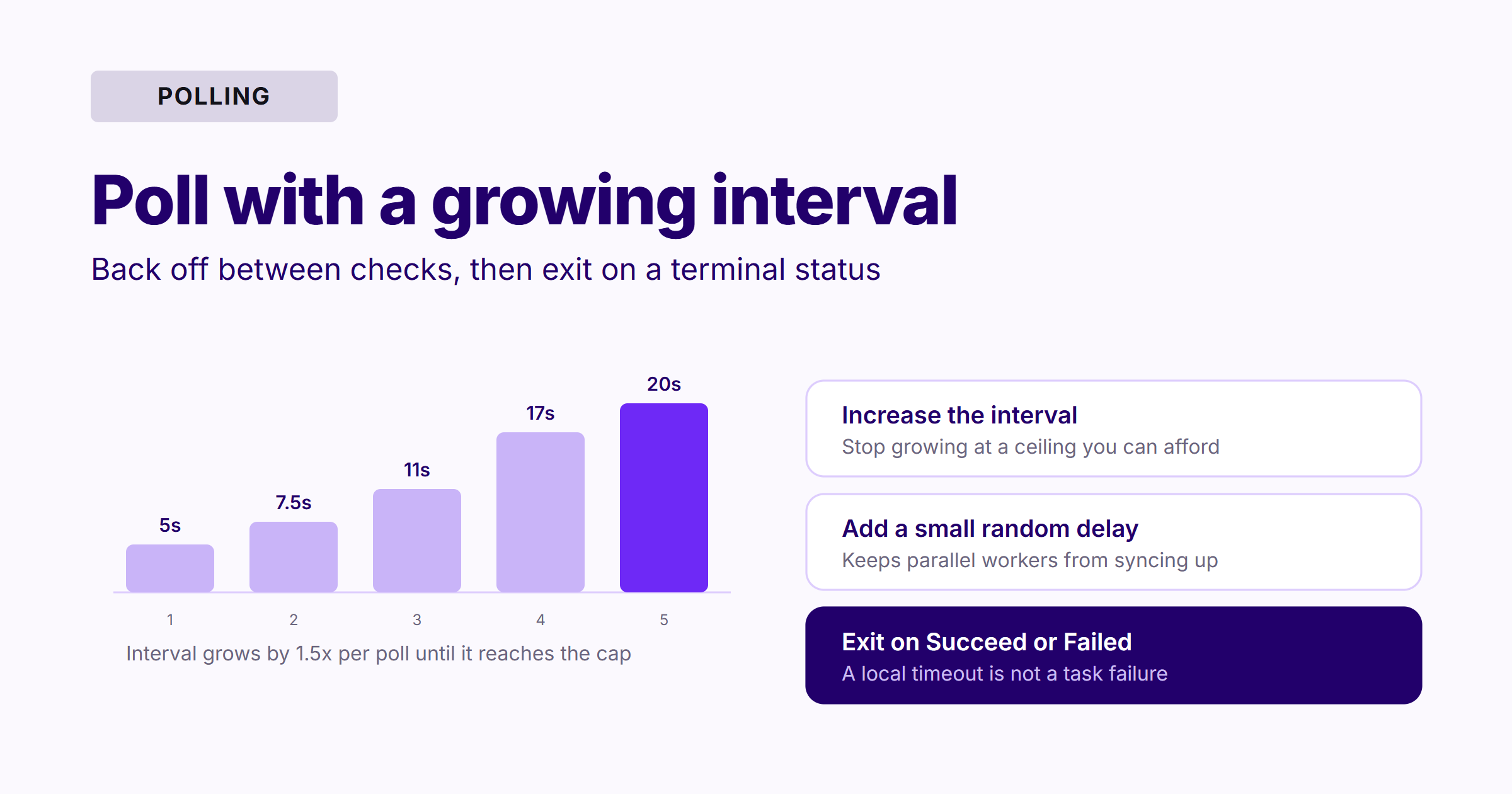
A practical strategy should:
Wait between status checks
Increase the interval while the task remains unfinished
Add a small random delay when many workers are polling
Stop after Succeed or Failed
Apply a maximum local waiting period
Preserve the requestId when local polling stops
A local timeout does not mean the generation task has failed. It only means the current process has stopped waiting. Another worker can resume polling with the same requestId.
Do not immediately submit a second generation request because the first remains InQueue. Doing so can create duplicate videos and unnecessary usage.
How to Handle Video Generation Status and Failures
An HTTP error and a task with the status Failed are different conditions.
Only 429, 503, and 504 are worth retrying unchanged.
Result
Likely Meaning
Recommended Handling
400
Invalid request parameters
Correct the request before retrying
401
Invalid or missing API key
Check authentication
403
Insufficient access
Check account and model permissions
429
A rate limit was reached
Wait and retry with backoff
503 or 504
Temporary service or load issue
Use bounded retries
500
Unexpected service error
Log the response and investigate
Status Failed
The generation task failed
Read reason before resubmitting
Do not retry 400, 401, or 403 responses with the same unchanged request.
For 429, 503, and 504, use a limited number of retries with increasing delays. Rate limits are applied at the account level, while separate models can have different limits.
End-to-End Python Example: Submit, Poll, and Download
The following example submits a text-to-video request, retries temporary API failures, polls with an increasing interval, and downloads the result.
importosimportrandomimporttimefrompathlibimportPathfromtypingimportAnyimportrequestsAPI_KEY = os.environ["SILICONFLOW_API_KEY"]BASE_URL = "https://api.siliconflow.com/v1"MAX_API_RETRIES = 4MAX_WAIT_SECONDS = 15 * 60INITIAL_POLL_SECONDS = 5MAX_POLL_SECONDS = 20RETRYABLE_STATUS_CODES = {429,503,504}HEADERS = {"Authorization": f"Bearer {API_KEY}","Content-Type": "application/json",}defpost_json_with_retry(url: str,payload: dict[str,Any],) -> requests.Response:
"""Send a POST request with bounded retries."""forattemptinrange(MAX_API_RETRIES + 1):
try:
response = requests.post(url,headers=HEADERS,json=payload,timeout=30,)except(requests.Timeout,requests.ConnectionError):
ifattempt == MAX_API_RETRIES:
raisedelay = min((2**attempt) + random.uniform(0,1),20)time.sleep(delay)continueifresponse.status_codenotinRETRYABLE_STATUS_CODES:
response.raise_for_status()returnresponseifattempt == MAX_API_RETRIES:
response.raise_for_status()delay = min((2**attempt) + random.uniform(0,1),20)print(f"Temporary HTTP {response.status_code}. "f"Retrying in {delay:.1f} seconds.")time.sleep(delay)raiseRuntimeError("The API request failed after all retries.")defsubmit_video(payload: dict[str,Any]) -> str:
response = post_json_with_retry(f"{BASE_URL}/video/submit",payload,)request_id = response.json().get("requestId")ifnotrequest_id:
raiseRuntimeError("The submission response did not contain a requestId.")returnrequest_iddefget_video_status(request_id: str) -> dict[str,Any]:
response = post_json_with_retry(f"{BASE_URL}/video/status",{"requestId": request_id},)returnresponse.json()defwait_for_video(request_id: str) -> dict[str,Any]:
deadline = time.monotonic() + MAX_WAIT_SECONDSpoll_seconds = INITIAL_POLL_SECONDSwhiletime.monotonic() < deadline:
data = get_video_status(request_id)status = data.get("status")ifstatusin{"InQueue","InProgress"}:
print(f"Current status: {status}")time.sleep(poll_seconds + random.uniform(0,1))poll_seconds = min(poll_seconds * 1.5,MAX_POLL_SECONDS,)continueifstatus == "Failed":
reason = data.get("reason")or("No failure reason was returned.")raiseRuntimeError(f"Video generation failed: {reason}")ifstatus == "Succeed":
videos = data.get("results",{}).get("videos",[])ifnotvideosornotvideos[0].get("url"):
raiseRuntimeError("The task succeeded, but no video URL was returned.")returndataraiseRuntimeError(f"Unexpected task status: {status!r}")raiseTimeoutError("Local polling ended before generation completed. "f"Save this requestId and check it later: {request_id}")defdownload_video(video_url: str,output_path: Path,) -> None:
withrequests.get(video_url,stream=True,timeout=120,)asresponse:
response.raise_for_status()content_type = response.headers.get("Content-Type","")ifcontent_typeandnotcontent_type.startswith("video/"):
raiseRuntimeError(f"Unexpected Content-Type: {content_type}")withoutput_path.open("wb")asoutput_file:
forchunkinresponse.iter_content(chunk_size=1024 * 1024):
ifchunk:
output_file.write(chunk)defmain() -> None:
payload = {"model": "Wan-AI/Wan2.2-T2V-A14B","prompt": ("A small research drone flies above a green valley ""at sunrise. The camera follows from behind with ""steady forward movement. Soft morning light passes ""through low clouds."),"image_size": "1280x720","negative_prompt": ("flickering, distorted landscape, unstable camera"),"seed": 123456,}request_id = submit_video(payload)print(f"Request submitted: {request_id}")result = wait_for_video(request_id)video_url = result["results"]["videos"][0]["url"]output_path = Path(f"{request_id}.mp4")download_video(video_url,output_path)inference_time = (result.get("results",{})
.get("timings",{})
.get("inference"))print(f"Video saved to: {output_path.resolve()}")ifinference_timeisnotNone:
print(f"Inference time: {inference_time}")if__name__ == "__main__":
main()
importosimportrandomimporttimefrompathlibimportPathfromtypingimportAnyimportrequestsAPI_KEY = os.environ["SILICONFLOW_API_KEY"]BASE_URL = "https://api.siliconflow.com/v1"MAX_API_RETRIES = 4MAX_WAIT_SECONDS = 15 * 60INITIAL_POLL_SECONDS = 5MAX_POLL_SECONDS = 20RETRYABLE_STATUS_CODES = {429,503,504}HEADERS = {"Authorization": f"Bearer {API_KEY}","Content-Type": "application/json",}defpost_json_with_retry(url: str,payload: dict[str,Any],) -> requests.Response:
"""Send a POST request with bounded retries."""forattemptinrange(MAX_API_RETRIES + 1):
try:
response = requests.post(url,headers=HEADERS,json=payload,timeout=30,)except(requests.Timeout,requests.ConnectionError):
ifattempt == MAX_API_RETRIES:
raisedelay = min((2**attempt) + random.uniform(0,1),20)time.sleep(delay)continueifresponse.status_codenotinRETRYABLE_STATUS_CODES:
response.raise_for_status()returnresponseifattempt == MAX_API_RETRIES:
response.raise_for_status()delay = min((2**attempt) + random.uniform(0,1),20)print(f"Temporary HTTP {response.status_code}. "f"Retrying in {delay:.1f} seconds.")time.sleep(delay)raiseRuntimeError("The API request failed after all retries.")defsubmit_video(payload: dict[str,Any]) -> str:
response = post_json_with_retry(f"{BASE_URL}/video/submit",payload,)request_id = response.json().get("requestId")ifnotrequest_id:
raiseRuntimeError("The submission response did not contain a requestId.")returnrequest_iddefget_video_status(request_id: str) -> dict[str,Any]:
response = post_json_with_retry(f"{BASE_URL}/video/status",{"requestId": request_id},)returnresponse.json()defwait_for_video(request_id: str) -> dict[str,Any]:
deadline = time.monotonic() + MAX_WAIT_SECONDSpoll_seconds = INITIAL_POLL_SECONDSwhiletime.monotonic() < deadline:
data = get_video_status(request_id)status = data.get("status")ifstatusin{"InQueue","InProgress"}:
print(f"Current status: {status}")time.sleep(poll_seconds + random.uniform(0,1))poll_seconds = min(poll_seconds * 1.5,MAX_POLL_SECONDS,)continueifstatus == "Failed":
reason = data.get("reason")or("No failure reason was returned.")raiseRuntimeError(f"Video generation failed: {reason}")ifstatus == "Succeed":
videos = data.get("results",{}).get("videos",[])ifnotvideosornotvideos[0].get("url"):
raiseRuntimeError("The task succeeded, but no video URL was returned.")returndataraiseRuntimeError(f"Unexpected task status: {status!r}")raiseTimeoutError("Local polling ended before generation completed. "f"Save this requestId and check it later: {request_id}")defdownload_video(video_url: str,output_path: Path,) -> None:
withrequests.get(video_url,stream=True,timeout=120,)asresponse:
response.raise_for_status()content_type = response.headers.get("Content-Type","")ifcontent_typeandnotcontent_type.startswith("video/"):
raiseRuntimeError(f"Unexpected Content-Type: {content_type}")withoutput_path.open("wb")asoutput_file:
forchunkinresponse.iter_content(chunk_size=1024 * 1024):
ifchunk:
output_file.write(chunk)defmain() -> None:
payload = {"model": "Wan-AI/Wan2.2-T2V-A14B","prompt": ("A small research drone flies above a green valley ""at sunrise. The camera follows from behind with ""steady forward movement. Soft morning light passes ""through low clouds."),"image_size": "1280x720","negative_prompt": ("flickering, distorted landscape, unstable camera"),"seed": 123456,}request_id = submit_video(payload)print(f"Request submitted: {request_id}")result = wait_for_video(request_id)video_url = result["results"]["videos"][0]["url"]output_path = Path(f"{request_id}.mp4")download_video(video_url,output_path)inference_time = (result.get("results",{})
.get("timings",{})
.get("inference"))print(f"Video saved to: {output_path.resolve()}")ifinference_timeisnotNone:
print(f"Inference time: {inference_time}")if__name__ == "__main__":
main()
importosimportrandomimporttimefrompathlibimportPathfromtypingimportAnyimportrequestsAPI_KEY = os.environ["SILICONFLOW_API_KEY"]BASE_URL = "https://api.siliconflow.com/v1"MAX_API_RETRIES = 4MAX_WAIT_SECONDS = 15 * 60INITIAL_POLL_SECONDS = 5MAX_POLL_SECONDS = 20RETRYABLE_STATUS_CODES = {429,503,504}HEADERS = {"Authorization": f"Bearer {API_KEY}","Content-Type": "application/json",}defpost_json_with_retry(url: str,payload: dict[str,Any],) -> requests.Response:
"""Send a POST request with bounded retries."""forattemptinrange(MAX_API_RETRIES + 1):
try:
response = requests.post(url,headers=HEADERS,json=payload,timeout=30,)except(requests.Timeout,requests.ConnectionError):
ifattempt == MAX_API_RETRIES:
raisedelay = min((2**attempt) + random.uniform(0,1),20)time.sleep(delay)continueifresponse.status_codenotinRETRYABLE_STATUS_CODES:
response.raise_for_status()returnresponseifattempt == MAX_API_RETRIES:
response.raise_for_status()delay = min((2**attempt) + random.uniform(0,1),20)print(f"Temporary HTTP {response.status_code}. "f"Retrying in {delay:.1f} seconds.")time.sleep(delay)raiseRuntimeError("The API request failed after all retries.")defsubmit_video(payload: dict[str,Any]) -> str:
response = post_json_with_retry(f"{BASE_URL}/video/submit",payload,)request_id = response.json().get("requestId")ifnotrequest_id:
raiseRuntimeError("The submission response did not contain a requestId.")returnrequest_iddefget_video_status(request_id: str) -> dict[str,Any]:
response = post_json_with_retry(f"{BASE_URL}/video/status",{"requestId": request_id},)returnresponse.json()defwait_for_video(request_id: str) -> dict[str,Any]:
deadline = time.monotonic() + MAX_WAIT_SECONDSpoll_seconds = INITIAL_POLL_SECONDSwhiletime.monotonic() < deadline:
data = get_video_status(request_id)status = data.get("status")ifstatusin{"InQueue","InProgress"}:
print(f"Current status: {status}")time.sleep(poll_seconds + random.uniform(0,1))poll_seconds = min(poll_seconds * 1.5,MAX_POLL_SECONDS,)continueifstatus == "Failed":
reason = data.get("reason")or("No failure reason was returned.")raiseRuntimeError(f"Video generation failed: {reason}")ifstatus == "Succeed":
videos = data.get("results",{}).get("videos",[])ifnotvideosornotvideos[0].get("url"):
raiseRuntimeError("The task succeeded, but no video URL was returned.")returndataraiseRuntimeError(f"Unexpected task status: {status!r}")raiseTimeoutError("Local polling ended before generation completed. "f"Save this requestId and check it later: {request_id}")defdownload_video(video_url: str,output_path: Path,) -> None:
withrequests.get(video_url,stream=True,timeout=120,)asresponse:
response.raise_for_status()content_type = response.headers.get("Content-Type","")ifcontent_typeandnotcontent_type.startswith("video/"):
raiseRuntimeError(f"Unexpected Content-Type: {content_type}")withoutput_path.open("wb")asoutput_file:
forchunkinresponse.iter_content(chunk_size=1024 * 1024):
ifchunk:
output_file.write(chunk)defmain() -> None:
payload = {"model": "Wan-AI/Wan2.2-T2V-A14B","prompt": ("A small research drone flies above a green valley ""at sunrise. The camera follows from behind with ""steady forward movement. Soft morning light passes ""through low clouds."),"image_size": "1280x720","negative_prompt": ("flickering, distorted landscape, unstable camera"),"seed": 123456,}request_id = submit_video(payload)print(f"Request submitted: {request_id}")result = wait_for_video(request_id)video_url = result["results"]["videos"][0]["url"]output_path = Path(f"{request_id}.mp4")download_video(video_url,output_path)inference_time = (result.get("results",{})
.get("timings",{})
.get("inference"))print(f"Video saved to: {output_path.resolve()}")ifinference_timeisnotNone:
print(f"Inference time: {inference_time}")if__name__ == "__main__":
main()
The polling values in this example are application settings, not fixed API requirements. Adjust them according to your workload, user experience, and rate limits.
In a production web application, run polling in a background worker instead of keeping the original browser request open.
How Should Applications Store Generated Videos?
Download the Result Promptly
Begin downloading as soon as the task reaches Succeed.
Only mark the job as fully complete after the file has been transferred to your own storage. When generation succeeds but storage fails, keep the job in a separate state such as storage_pending so the file transfer can be retried.
Move the File to Object Storage
Upload the result to your application's object storage or media platform. Save the resulting object key rather than the temporary generation URL.
For private content, keep the object restricted and generate signed URLs when users need access.
Save Generation Metadata
A production record can include:
Internal job ID
SiliconFlow requestId
Model ID
Prompt or prompt hash
Source image reference
Output resolution
Seed
Current task status
Failure reason
Inference time
Submission and completion timestamps
Storage object key
File size or checksum
Do not write API keys, Base64 images, or sensitive prompts into unrestricted logs.
Set a Retention Policy
Define how long generated files and task records remain available. Remove temporary local files after a successful upload, clear abandoned jobs according to application policy, and support user deletion when required by the product.
With SiliconFlow, developers can access text, image, audio, and video models through one platform. This reduces the need to integrate and maintain a separate serving environment for every AI capability while supporting flexible, pay-as-you-go application development.
FAQs
Why Does a Video Generation API Return a Request ID?
Video generation is a long-running task. The requestId lets your application check progress through a separate endpoint without keeping the initial submission request open.
Can an Application Resume Polling After a Local Timeout?
Yes. Save the original requestId and use it in a later status request. A local timeout does not automatically cancel or fail the server-side generation task.
Should I Submit a New Job if the Status Remains InQueue?
Not immediately. Continue polling at a controlled interval unless the API returns Failed. Repeating the submission may create duplicate videos and unnecessary usage.
Does Image-to-Video Use the Same Status Endpoint?
Yes. Both text-to-video and image-to-video requests are submitted through /video/submit and checked through /video/status. The input payload changes, but the asynchronous workflow remains the same.
Can AI-Generated Videos Be Stored Permanently?
Yes. Download the result while its temporary URL is available and transfer it to your own storage system. Save your storage key or internal media URL instead of relying on the generation URL.

![Five-stage asynchronous video job lifecycle: submit the request to POST /video/submit, save the returned requestId to your database, poll POST /video/status with growing intervals, retrieve the temporary results.videos[].url, then move the file to your own object storage and store the object key rather than the URL](https://framerusercontent.com/images/6bexOtYJhRpF5GNSkqycNOhjwqE.webp?width=2400&height=1260)